
Key takeaways:
Collecting customer reviews is essential for building trust, winning new jobs, and growing your home service business. Here’s how to ask for a review:
- Ask at the right moment. Request reviews after completing a job and ensuring your customer is satisfied, using natural opportunities like follow-up emails, thank-you calls, or positive feedback moments.
- Tailor your approach. Reach out for reviews through various channels like face-to-face, by phone, via text message, over email, and on social media. Or, directly from your website to make it easy and convenient for your customers.
- Avoid common mistakes. Don’t ask before a job is finished, offer incentives, solicit reviews from unhappy customers, or forget to track previous reviews. These missteps can harm your reputation and reduce your chances of receiving positive feedback.
- Automate your review requests. Use review management software like Jobber to streamline the process, send requests at the right time, track your feedback, and respond quickly.
- Keep reviews fresh and diversified. Consistently gathering recent reviews and showcasing them across platforms enhances your credibility, strengthens your online reputation, and helps your business stand out from competitors.
For more actionable tips and the latest advice on running your service business, sign up for the Jobber Newsletter.
Originally published in November 2019. Last updated on November 14, 2025.
Up to 97% of consumers read reviews before making a purchase or booking a service. If you don’t include reviews in your service business’s marketing plan, you could be missing out on new customers and booked jobs.
And while 96% of people are willing to leave a business review, most won’t unless you ask them to.
Use these tips to learn how to ask for a review from happy clients so they’re more likely to follow through—helping you win more jobs, boost your online presence, and grow your business.
How to ask a customer for a review:
Why should you ask for customer reviews?
Since 55% of homeowners search for service providers online before choosing one to work with, getting noticed online is essential for growing your service business. One of the best ways to do this is by encouraging happy customers to share their experiences in a review.
Reviews carry real influence. About two-thirds of US consumers say they’re influenced by reviews when making a buying decision.
When you encourage customers to leave feedback, you create opportunities to:
- Build credibility and trust with potential customers
- Demonstrate your expertise and professionalism
- Stand out from your competitors
- Boost your online reputation and presence
Reviews also act as social proof and add to your search engine optimization (SEO) efforts. This helps you reach a bigger audience and convince prospective clients you’re the right service provider for the job.
Even simple star ratings can make a big difference, as service businesses with star ratings of 4 or more generate 32% more revenue than those with lower scores or no reviews.
When to ask for a review
It’s best practice to wait until a job’s finished to ask for a customer review. Then you know the customer is happy with the work, and more likely to leave positive feedback. But exactly when to make your request isn’t always clear.
For a smooth experience, natural opportunities to ask for a review include:
- In a follow-up email or on a final invoice
- During a thank-you call
- After resolving a service issue positively
- In a post-work survey or questionnaire
- After an ongoing service for a recurring client
- When you receive a referral or repeat booking
Just make sure the customer’s happy with your work beforehand, otherwise they may leave a negative review.
If you ask for a review and the customer agrees but doesn’t follow through, you can send a reminder a week or two later.
Pro Tip: When a customer does leave a positive review, send a thank-you note to show them how much you appreciate their time and effort.
How to ask for a review in person
Asking a customer for a review face-to-face can be intimidating. But if you find the right opportunity, requesting a review can be a natural—and very effective—part of the conversation.
Instead of asking right after the job’s done, wait for the customer to give you a positive cue like:
- Wow, your team did a great job!
- I’m so happy with how things turned out.
- Can’t wait to get started on our next project!
- [Employee Name] was great!
- I’m going to recommend you to my friend.
- I shared pictures of your work on social media, and everyone’s so impressed!
If you don’t find a natural way to bring up reviews, try asking open-ended questions, like:
- How was your experience with our company?
- Would you use our services again?
- Are you satisfied with how the job turned out?
If you get positive feedback, like a referral or plans to hire you again, consider it a green light to ask for a review.
Since you’ll want them to leave an online review, like on your Facebook business page or Google Business Profile, here’s what you can say:
Thanks for [your positive feedback/referring me]! I really appreciate it. If you have a minute, would you mind leaving a review on Google or Facebook? It really helps customers like you find my business and services.
When the customer agrees to leave a review, you can email them the link to your review page, along with instructions to make the process easier.
How to ask customers for reviews on Google
To start collecting reviews on Google, you’ll need to claim your Google Business Profile and fill it out with your business information. For example, you’ll need to include your business name, hours, services, and location.
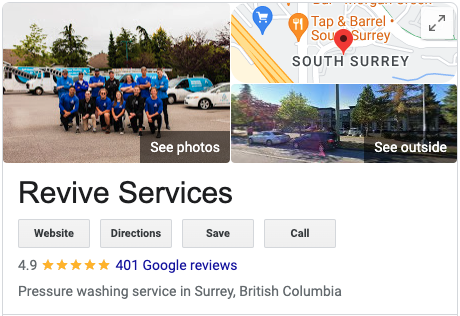
Once it’s set up, you can start directing customers to your Google Business Profile to leave a review by adding a link to your emails, text messages, and social media posts.
Pro Tip: To get a direct link to share with customers, go to your Google Business Profile, click “Share review form,” and copy the link.
How to ask for a review over the phone
While you can cold-call clients, asking for a review over the phone works best during a follow-up call or when a customer reaches out with a question.
For example, here’s a script you can use to ask for a review during a phone call:
Hi [Customer Name]! It’s [Your Name] calling from [Business Name]. I’m calling to ask about your [Service] experience with us. How did everything go for you?
If they respond negatively or ask you to come back for a touch-up, don’t ask for a review. Instead, take their feedback seriously and consider how you can make the situation right.
But if the customer responds positively, you can say:
I’m really glad to hear it, thanks so much for your feedback! We really appreciate your business. Would you mind taking a few minutes to leave us a review on [Review Platform]? It helps other customers find [Business Name] and trust our services.
Then, as soon as you hang up, send the customer an email with instructions, including a link to the review platform you want them to use.
How to ask for a review on social media
4.8 billion people use social media, making it an ideal way to communicate with customers to ask for reviews. You can use it to request reviews on other platforms, such as Google and Yelp. Or, with Facebook, you can collect and manage reviews directly on your business page.
Depending on which social media platform you use, you can:
- Make a public post (video, text, or photo) asking customers to review your services
- Send DMs to clients you’ve worked with to request a review for the job you did
- Add a review link to your bio or about section so customers can easily leave feedback
- Include review reminders in your stories or highlights on Instagram and Facebook
- Share positive testimonials and encourage other customers to do the same
You can also ask for reviews in response to positive comments from followers.
For example, if you share a photo of a recent pressure washing job, and someone comments, “Had my deck pressure washed by you a few weeks ago and it’s never looked better!”, it’s the perfect time to ask for a customer review.
You can respond with something like:
“We’re really glad to hear that! Thanks so much for your feedback. If you have a few minutes, would you mind leaving us a review? It would help us out a lot! [link to review platform].”
READ MORE: Facebook post ideas for service businesses
How to ask for a review through a text message
Text messages are convenient, fast, and less disruptive than phone calls, making them a good option for review requests.
Plus, you can include a link to your review platform directly in your message, making it easy for customers to follow through. For example, you can say:
- Hi [Customer Name], it’s [Your Name] from [Business Name]. If you have a few moments, please tell us how we did with your recent [Service]: [Link]
- Hi [Customer Name], thanks for choosing [Business Name] for [Service]. If you have a moment, please leave us a review here: [Link]
- Hi [Customer Name], thanks for choosing [Business Name]! Let us know how we did today: [Link]
Just make sure your client is comfortable with receiving text messages from you. If you haven’t communicated via SMS before, it’s best to stick with another method.
How to ask for a review in an email
Asking for a review via email is one of the easiest and most common ways to request feedback from clients. With over 4 billion email users worldwide, chances are your customers not only have email accounts but also know how to use them.
All you need is their email address and a review process to get started. For example, you can either use email software to automate campaigns or send emails manually.
Sending emails manually is a good option if you have a small client list or you want to personalize an email for a specific client. But they can quickly become time-consuming and prone to mishaps like incorrect email addresses as your customer base grows.
Using email campaign software like Jobber can automate the process, saving you time and preventing errors. It also allows you to create reusable templates that look professional and maintain your business branding, like your logo.
Personalized review request email template
If you want to ask a client for a review using a personalized email, work from this template:
Subject line: Thoughts on [Project Name]
Hi [Customer Name],
It was great working with you on [your kitchen renovation/outdoor living space/HVAC project], and we hope you and [the family/the team/the pets] are happy with the results. We really loved having a chance to [try out new materials/work on such a unique project/help you with ____].
If you have a few minutes, we’d really appreciate it if you could share your experience by leaving us a review here: [Review Link]. Your feedback helps other homeowners know they can trust [Business Name].
Thanks again for choosing us!
[Your Name]
General review request email template
For a generic email you send to request reviews from multiple customers at once, you can use this template:
Subject line: Tell us how we did!
Hi [Customer Name],
Thanks for choosing [Business Name] for your [Service] needs! We hope you’re happy with the results.
If you have a few minutes, we’d really appreciate it if you could share your experience by leaving us a review here: [Review Link]. Your feedback helps other homeowners know they can trust [Business Name].
Thanks for your support!
[Your Name]
How to ask for a review on your website
Your business’s website is a great place to collect and feature reviews because it’s one of the first places most people will look. As a bonus, reviews also help to improve your local SEO, helping you appear higher in Google’s search results when a prospective customer searches for your services.
To ask for reviews using your website, you can try:
1. Adding call-to-action buttons
Add call-to-action (CTA) buttons to your website that ask customers to leave a review. They should have:
- A clear, attention-grabbing title
- Short, descriptive text that tells the customer what it’s for
- A button that links to your review platform, like Google or Facebook
Here’s an example from Guin Service with a clear CTA:
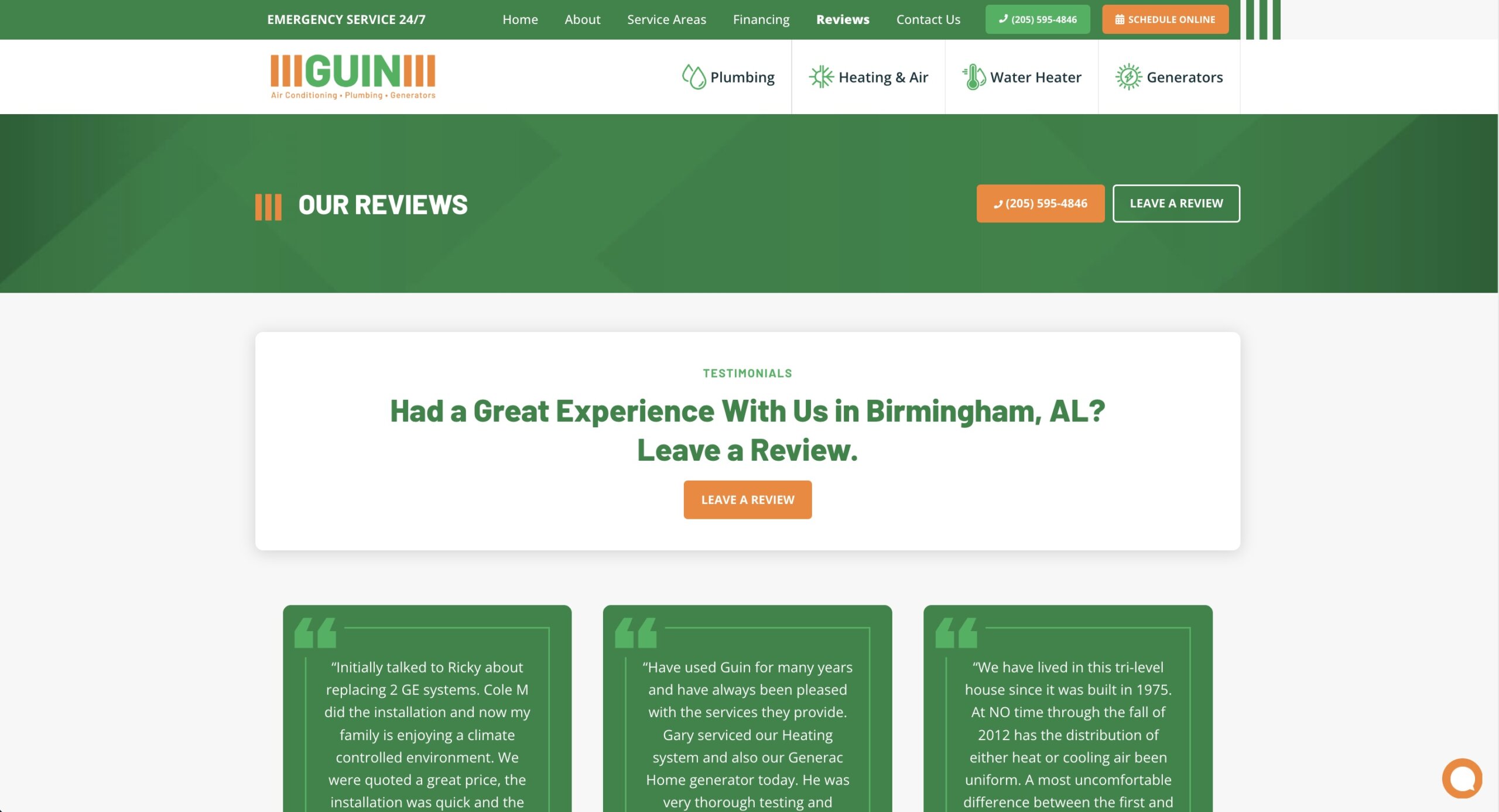
Include them on your most visited pages, like your home page, service page, blog, and contact page.
2. Making a testimonial page
A testimonial page on your website is a standalone page that showcases positive customer feedback and tells visitors how and where to leave a review.
It should include:
- Direct links to your review site(s)
- Calls to action to prompt customers to leave reviews
- Customer reviews from your Google Business Profile, Facebook page, or other review platform
Pro Tip: Not every review will be well written, so include a simple disclaimer like this: “By submitting a review, you agree to have the included information shared publicly on our website in a review format. Some reviews may be edited for length and/or clarity.”
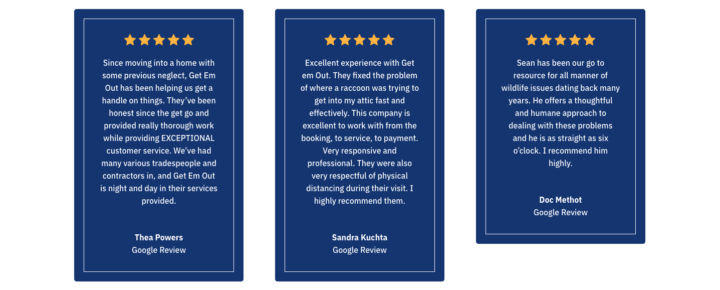
When you build a website with Jobber, you can connect your website and Google Business Profile.
This way, positive reviews and five-star ratings are automatically updated on your website, keeping content fresh by showcasing the latest testimonials.
How not to ask for reviews
A strong review game relies on following best practices. To increase your chances of success, make sure to avoid:
1. Asking for a review before a job’s finished
You should only ask for a review after a job’s completely finished, including any touch-ups or follow-ups. Make sure the customer is satisfied and there are no outstanding tasks before making your request. Otherwise, they may not be able to provide accurate feedback about your work.
For example, they may mention that you forgot to install fence post caps even though you’ve already scheduled someone to take care of it.
Waiting until everything is complete and the client is happy improves your chances of not only getting a review, but a positive one.
2. Offering gifts or discounts
Reviews given in exchange for rewards don’t just come off as inauthentic and biased, but many review platforms prohibit them.
For example, Google will remove any reviews that include “Content that has been posted due to an incentive offered by a business – such as payment, discounts, free goods and/or services.”
To keep your business safe and protect your reputation on review platforms, don’t offer incentives for reviews. Instead, focus on providing high-quality services and a great customer experience to make clients want to give you a glowing testimonial.
3. Reaching out to unhappy customers
Asking an unsatisfied or disgruntled customer for a review won’t just sour your relationship— it can result in a bad review, damaging your online reputation, and scaring away potential clients.
Before requesting a review, check to make sure the customer didn’t make any complaints or customer service requests to your team. If they did, complete the repair or resolve the issue as soon as possible.
If they’re pleased with the end result, you can ask for a review once the job’s done.
But if they’re still unhappy, even though you did everything you could to make things right, don’t bother asking for a review. Chances are, it will be negative.
READ MORE: How to respond to a negative review
4. Forgetting to track reviews
Before asking for a review from a customer, check to see if they’ve left one already. If they haven’t, and they’re happy with the finished work, you can send your review request.
But if they have left you a review, asking again could make you look unprofessional and disorganized.
Do a quick check or use review tracking software to stay on top of reviews, so you don’t accidentally ask customers twice.
And if you do see they’ve left a review, use it as an opportunity to show you value their feedback, respect their time, and are committed to providing top-notch customer service.
Make sure that every time a customer is leaving you a review, you wanna respond, whether good or bad.
So you wanna be able to address the bad reviews, and you might wanna say, “Hey, we’re sorry that you felt that way. We appreciate you reaching out to us. We would like to address your concern. Someone from the office will be reaching out to call you.”

5. Missing out on review opportunities
When it comes to reviews, one or two testimonials from five years ago won’t cut it.
You wanna be collecting as many reviews as humanly possible all of the time. Do not miss out on reviews.

Asking for reviews often keeps them fresh, boosts your overall rating, and shows you have a large customer base. It’s an effective way to build trust, increase your presence on review platforms, and attract new customers.
6. Only using one review strategy
When you ask for reviews, spread your strategy across multiple platforms to get the biggest return. For example, make social media posts on your business pages, send out email campaigns, and train your team members to ask for reviews at job sites.
The more bases you cover, the more reviews you’ll collect.
How to automate review requests with software
Requesting, tracking, and responding to reviews manually is a lot of work. While it’s feasible if you only have a small client base, or you’re just starting out, over time, it can add up, taking up a big chunk of your working hours.
Review software like Jobber makes managing reviews easier by:
- Helping you create customized email campaign templates
- Automating review requests that only send once a job is complete
- Generating review responses you can use in seconds
- Showing you review trends to see how your online reputation grows over time
- Giving you an overview of how your business compares to local competitors online
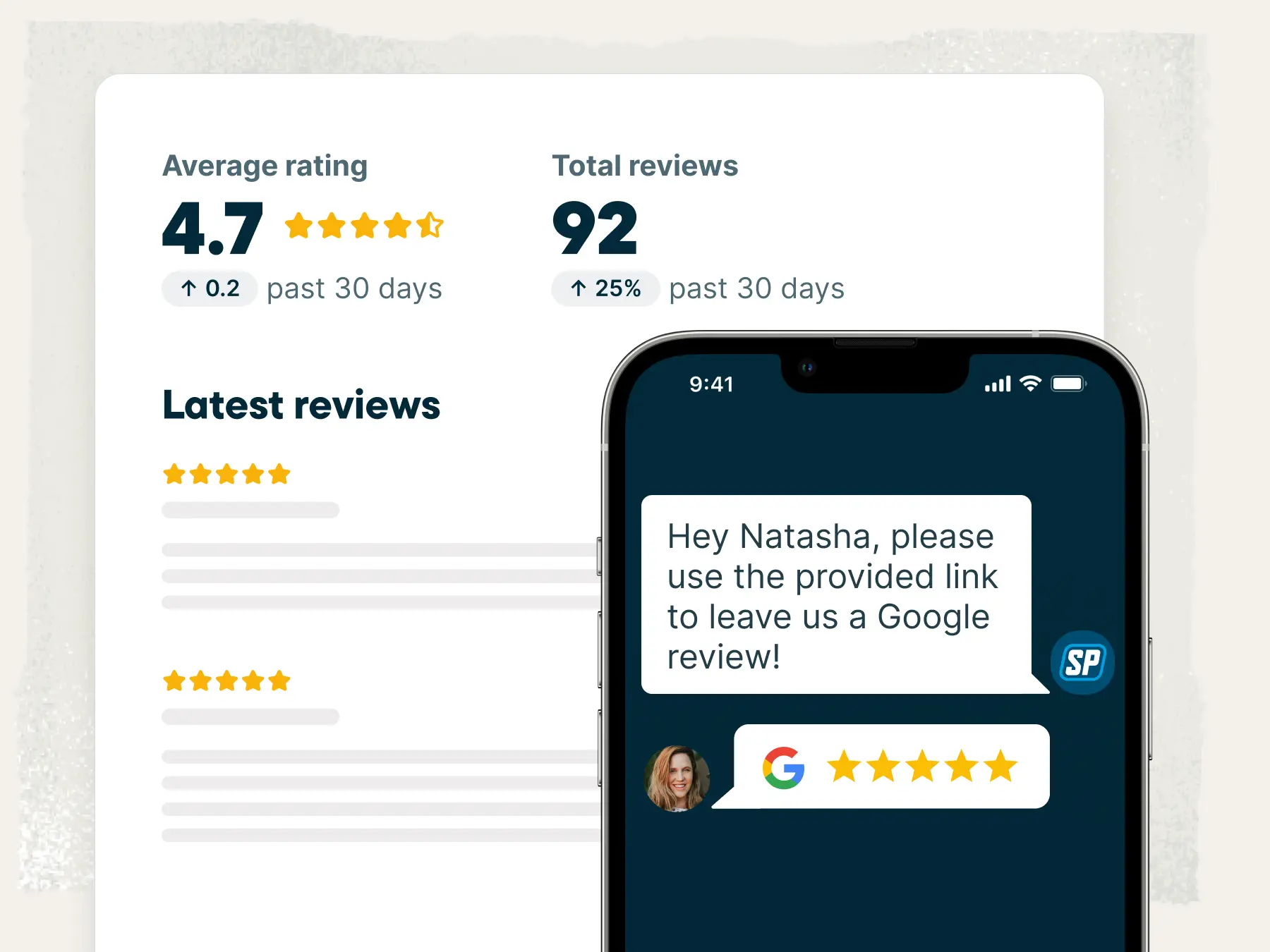
That can help you get twice as many reviews, leading to more potential customers and booked jobs.
Thanks to Jobber, we’ve more than doubled our reviews and got about $25,000 worth of jobs after sending our first campaign.

Frequently Asked Questions
-
To get more reviews on Google and Yelp, make sure to:
• Choose one review platform to send customers to
• Share direct links to your Google Business Profile or Yelp page in review requests
• Add “Review us on Google” or “Review us on Yelp” to your website, emails, invoices, and social media pages
If you decide to focus on Google, you can also use software like Jobber to connect your Google Business Profile to your website.
To encourage more positive feedback on either platform, you can prioritize:
• Providing high-quality services
• Offering an excellent customer experience
• Asking as many customers for reviews as possible
• Being conscious of review request timing
Pro Tip: Avoid asking for Yelp reviews in bulk as they may be flagged. Instead, collect reviews naturally by asking happy customers to share their thoughts. -
The best thing you can do when you receive a negative review is respond. But before you do, learn as much as you can about the situation by:
• Reviewing all documentation related to the job
• Talking to your team members about the work and client
• Checking your records to confirm it’s a real complaint
From there, determine whether there’s anything you can do to resolve the issue. If there is, make a plan for what you can to make it right and respond with something like:
We’re so sorry to hear about your experience, [customer name]. We want to make it right. Please reach out to us at [email address] or [phone number] so we can discuss the details.
But if there isn’t, you should still acknowledge their feedback. For example, you can say:
Thank you for reaching out, [customer name]. We’re sorry to hear about your experience and will use your feedback to improve our services. If you have any questions, please reach out to us at [email address] or [phone number]. -
If you get a fake or spam review on Google, you can submit a request for it to be removed by flagging the review on Google Maps, Google Business Profile, or Google search.
Google will review your request to determine whether the review in question meets its spam requirements. If it does, Google will remove it. But if it doesn’t, or if Google can’t confirm it’s a fake review, your request may be rejected.
If that happens, you can respond to the Google review in a way that shows other customers it’s spam by saying:
Hi [reviewer name], it looks like this review was left by mistake since we don’t have a record of your name or project in our customer files. If that’s the case, we’d really appreciate it if you could remove it. If you still need help, please reach out to us at [email address].
READ MORE: How to delete a Google review