11 HVAC Dispatching Tips to Cut Drive Time and Improve Communication

Key takeaways:
Improving your HVAC dispatching can help reduce technician drive time and improve communication across your team for a smoother, more efficient operation. Focus on the following to improve your process:
- Strengthen communication between technicians and the office. Establish clear protocols and use real-time updates to keep everyone on the same page, reducing miscommunications and job delays.
- Provide ongoing dispatcher training and conduct ride-alongs. Train dispatchers in real-world scenarios and software proficiency, and have them ride along with technicians to better understand the job and enhance teamwork.
- Prioritize jobs for efficiency and business growth. Classify service requests by urgency and revenue potential, making it easy to reorganize schedules and respond effectively to emergencies or high-value opportunities.
- Give technicians access to schedules and job details in advance. Use digital scheduling tools for easy access, keeping techs well-prepared with all the info they need for each job and minimizing wasted trips or confusion.
- Use location-based scheduling and route optimization. Group jobs by geographic area and assign them to nearby technicians to cut down on travel time and operating costs, boosting productivity and customer satisfaction.
- Plan for cancellations, breaks, and last-minute changes. Maintain a standby list for backfilling canceled appointments, schedule breaks to avoid burnout, and communicate job changes instantly.
- Track technician progress with GPS. Monitor technician locations in real time to manage delays, keep customers updated, and adjust schedules on the fly for maximum efficiency.
- Keep customers in the loop. Automate appointment reminders and send “on my way” notifications to build trust and reduce no-shows, enhancing the overall service experience.
For more practical tips and industry insights, sign up for the Jobber Newsletter. Subscribe here.
HVAC dispatching is the process of assigning the right technician to the right job, routing them efficiently, and keeping everyone (including the customer) on the same page. Since HVAC service requests happen around the clock, dispatching needs to sit at the center of your operations.
This means tackling questions like: How can you effectively add last-minute jobs to your team schedule? How should you pass along critical details to make sure technicians have the information they need to do a job correctly?
In this post, you’ll find practical tips for productive HVAC dispatching and how to win your time back with convenient tools.
HVAC scheduling and dispatching tips to save time and improve customer service:
-
Improve communication between technicians and the office
-
Schedule ride-alongs with your HVAC technicians
-
Offer ongoing training for dispatchers
-
Create a system to prioritize jobs
-
Give technicians access to schedules in advance
-
Make customer notes and details easy to access
-
Dispatch and route your team efficiently
-
Schedule consistent breaks
-
Have a backup plan for job cancellations and no-shows
-
Monitor technician progress with GPS tracking
-
Keep customers informed about upcoming visits
1. Improve communication between technicians and the office
Having a reliable communication plan keeps HVAC dispatchers and technicians on the same page as they receive new requests.
Whether you use a radio, phone, or HVAC service software, here are a few tips to fix dispatch communication:
- Set a communication protocol. Define when, how, and how often technicians and dispatchers should communicate. For example, do techs need to check in with their dispatcher once the job is done?
- Stay informed about job delays. Technicians should notify dispatchers when jobs go over their allotted time so office workers can manage customer complaints about delays. Have your technicians notify home base over text—or keep tabs on the tech’s location with GPS tracking (more on that later).
- Send automatic schedule updates to your crew. Automating these updates will save your dispatchers time and prepare your field techs for on-the-fly changes.
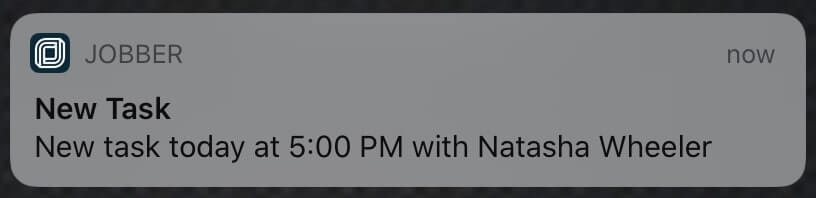
When you manage your team with Jobber’s HVAC software, anytime you make a schedule change to an employee’s current workday, they’ll get a notification on their phone with all the details.
2. Schedule ride-alongs with your HVAC technicians
To help dispatchers better understand what field workers experience on the job, ride-alongs may be the perfect training opportunity. These are chances for HVAC technicians to show dispatchers what their daily workload entails, not to mention how travel time and customer interactions can put a strain on their schedule.
If you’re in charge of dispatching, go on two or three ride-alongs to get a sense of the time your technicians spend on the job. If you manage a larger team with dedicated dispatchers, make ride-alongs with techs part of your dispatch training.
3. Offer ongoing training for dispatchers
Keeping dispatchers sharp requires steady attention and small adjustments, and that’s where ongoing training comes in. Here’s how to go about it.
Real-world scenarios
A good place to start is by going over real-world scenarios. HVAC operations move fast, so your dispatcher training should too. Take dispatchers through situations they actually deal with, like hectic mornings with emergency replacements. Or when a tech is stuck across town, and you’ve got a high-priority call waiting.
Case studies and “what would you do?” sessions help people practice the problem-solving they’ll need during peak season.
With the customer’s permission, recording real customer calls can be great for training purposes. Your team can hear what happened and how the dispatcher responded. As a group, think about what worked well on the call and what other solutions the dispatcher could have tried.
Software proficiency
Hands-on time with your field service management (FSM) software—whether you’re using the Jobber app or something else—can prevent small delays that turn into big headaches.
Let dispatchers click through the tools, change statuses, send messages, and watch how data flows from call to job completion. When people know the system front to back, you’ll see fewer urgent messages and more confident scheduling.
Communication skills
Communication is at the heart of dispatch. Teach your dispatchers to use clear, calm communication, especially in stressful moments. A friendly tone or a heads-up to a technician about a tricky homeowner can make the day go smoother.
Continuous feedback loops
To help your team remember what they learned in training, build a simple feedback loop. This could be a weekly huddle or a monthly refresher session.
These sessions aren’t meant as an opportunity to nitpick. Instead, they should help dispatchers spot patterns, adjust their habits, and even recommend improvements in your operations. With time and repetition of these key lessons, people will start taking more initiative, improve their responses, and, as a result, the chaotic days will feel a lot more manageable.
4. Create a system to prioritize jobs
Prioritizing your crew’s schedule is one of the easiest ways to stay organized and take on more work. To start, assign each type of job an urgency level: low, medium, or high.
For example, emergency AC repairs during the summer should receive the highest priority, while routine system maintenance appointments are usually lower priority.
You should be capturing enough information in your work request forms or customer phone call notes to determine how urgent a repair job is.
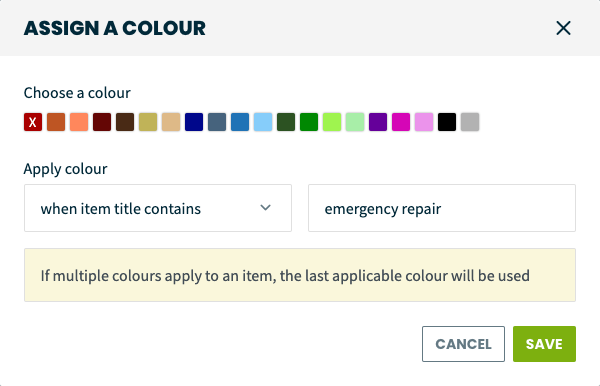
Jobber Tip: In Jobber, you can customize the color of different visits in your team calendar. This helps dispatchers recognize job urgency at a glance and make faster rescheduling decisions.
Set specific colors for visits with certain keywords in their title, like “emergency repair,” to help easily re-route unpredictable emergency calls.
Once you’ve got urgency mapped out, there’s another layer that can make a real difference on the bottom line—prioritizing by revenue potential. This involves making smarter decisions when your schedule gets tight.
Bigger jobs, such as installs and system replacements, come with strong revenue, and moving them up the priority ladder can help keep profitability steady without sacrificing service quality.
Long-term maintenance agreements, commercial accounts, or those property managers who pass along steady work all deserve priority too. When your dispatchers recognize these accounts as anchors for the business, it becomes easier to prioritize them over random, low-value jobs.
READ MORE: How to handle double booking scheduling issues like a pro
5. Give technicians access to schedules in advance
When HVAC techs can view their schedule at any time, they’ll be more prepared for the day ahead. The result is better customer service thanks to having the right information, HVAC tools, and equipment.
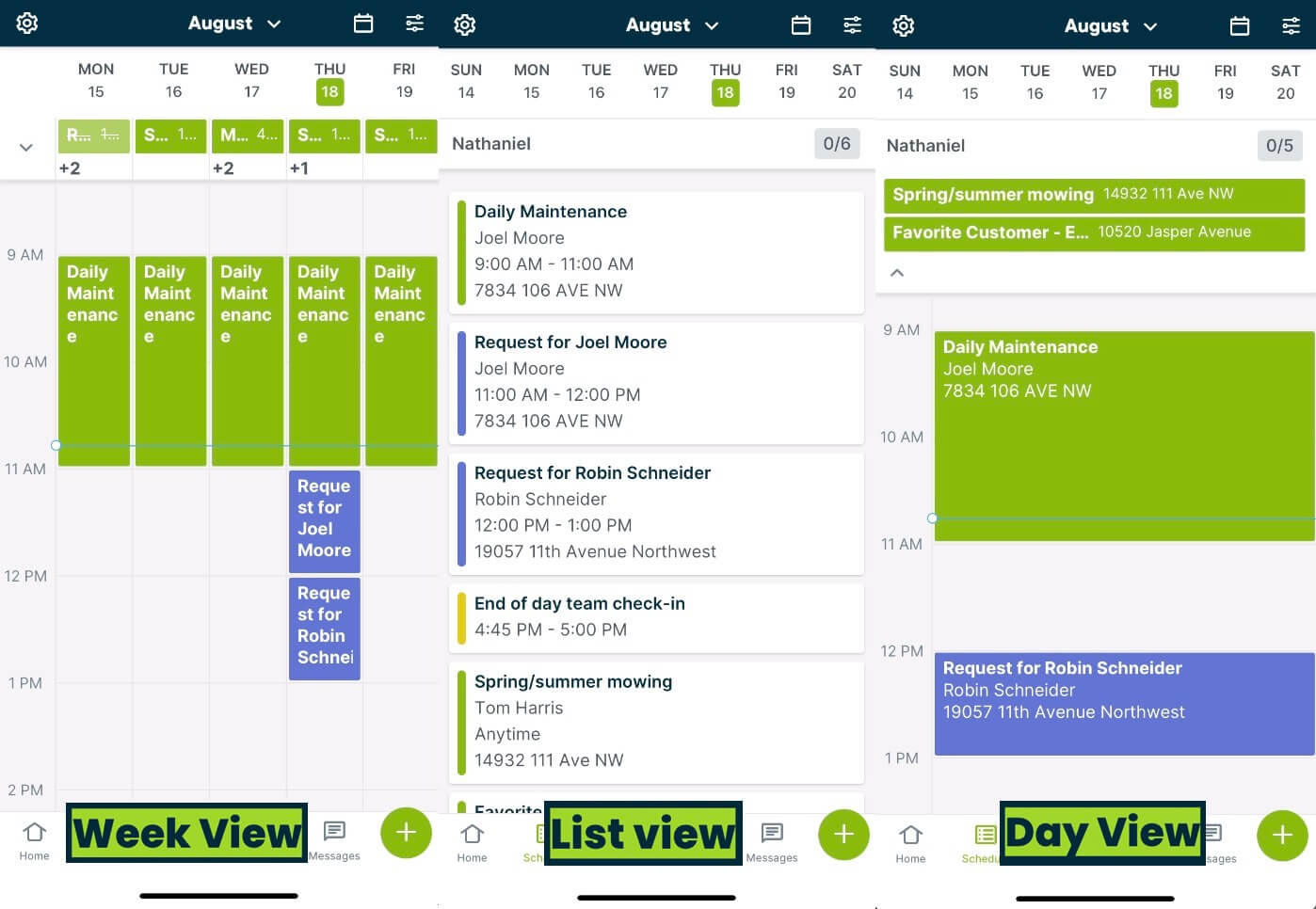
Use a shareable job schedule (like this one in Jobber) to easily reschedule jobs or reassign them to a different field service technician.
At the start of each day, technicians can check their schedule for a snapshot of what’s scheduled and who’s working. From the office, you or your dispatchers can track the crew’s progress throughout the day and make changes on the fly.
Jobber Tip: Choose from five different schedule views in Jobber—including weekly, monthly, and a map view—to match what’s most convenient for your dispatchers and techs.
6. Make customer notes and details easy to access
It’s always important to provide HVAC technicians with one consistent place they can go to access all the details they need to do a job well. Before techs arrive at a job site, make sure they know:
- Specific details about the job, customer, or property
- Notes or images that the field technician should review prior to the repair
- Any additional customer requests or questions that the technician can solve
All these details should be easy to share and refer back to digitally, which eliminates tedious back-and-forth emails or paper documents. Instead, use a customer relationship management system (CRM) or HVAC scheduling software to upload details.
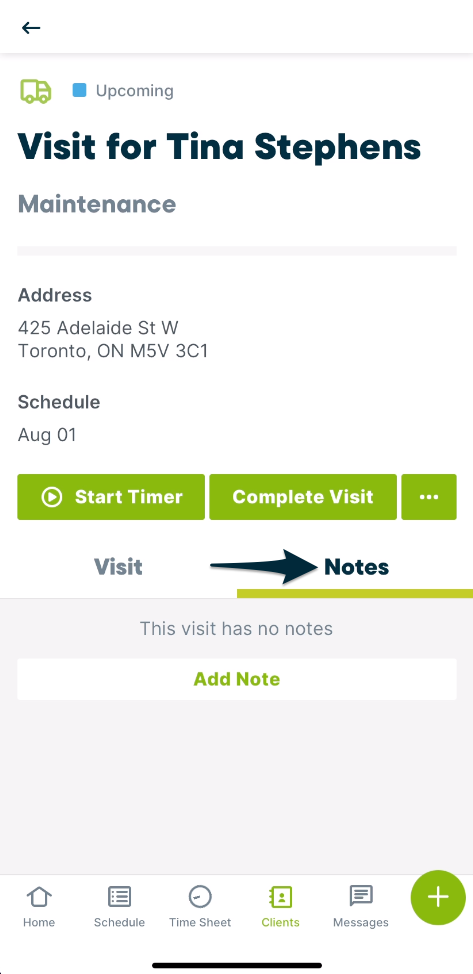
Jobber Tip: When a tech needs to access details about a service call, they can simply click on the visit in their Jobber calendar and see the original HVAC work order, notes, images, and other attachments.
7. Dispatch and route your team efficiently
Speed up HVAC scheduling and dispatching by assigning technicians to the jobs that are closest to them. Location-based scheduling reduces driving time between jobs, improves your crew’s efficiency, and makes managing a team of technicians easy.
Follow these steps to organize your crew by location:
- Organize visits into geographic “groups.” You or your dispatchers can group them by which part of the city or town they’re in (e.g., northeast, southwest, etc.), or by neighborhood if your services are more localized.
- Assign one technician (or crew) to each location group. This way, your staff will spend less time driving from one job to the next.
Make this process easier by using route planning software. Jobber automatically creates the most efficient crew schedule based on the location of each visit—and lets you track your team’s location as they’re driving from job to job.
Once you assign a job to a team member, you can select Route From Here and let Jobber map out the rest of their day’s work in the most efficient way possible.
Jobber has created a lot of free time for me and my life, especially at the end of the day, when I used to have to work into the evening.
Now, it’s great to know that my team is organized for the next day, so that the following morning isn’t a scramble.

Your team can then access their schedules, along with turn-by-turn directions to the next location, through the Jobber mobile app.
And if you have to make a last-minute schedule change to an employee’s workday, they’ll get a notification on their phone with all the details.
Planning efficient routes can also help your business:
- Improve your crew’s efficiency by completing jobs faster
- Save money from lowered fuel costs and vehicle maintenance
- Increase customer satisfaction with more reliable service
8. Schedule consistent breaks
Everyone at your HVAC company has the right to rest, so be diligent about scheduling. A balanced work schedule ensures that your team can function at peak productivity and complete every job accurately. Be mindful of including regular breaks in each HVAC technician’s schedule.
To more easily manage employee breaks, you can:
- Schedule breaks in advance. Setting a defined break time in each technician’s calendar (e.g., 12:00-12:45) before even scheduling jobs ensures you never miss a break.
- Figure out your team’s peak productivity periods. Plan your breaks immediately after the busiest, most productive times.
- Allow input from employees about their work breaks. Always make notes about employee preferences, and schedule breaks that accommodate them as best as you can.
Breaks ensure that your team stays well-rested and ready to do great work. Not only do scheduled breaks satisfy labor compliance standards, but they can also prevent burnout and fatigue.
Pro Tip: Check your regional and state guidelines on minimum rest periods or meal breaks. If you’re stuck, Google “[YOUR STATE] + required labor breaks” to get started.
9. Have a backup plan for job cancellations and no-shows
Cancellations and no-shows are annoying, but they’re part of life in HVAC. A fallback system protects your revenue and saves dispatchers from scrambling when a 2-hour slot is suddenly empty.
Maintain a standby list
A standby list helps you backfill open time when a job falls off the schedule. It’s a prioritized list of flexible, easily rescheduled jobs that can be “moved up” to fill gaps created by cancellations or no-shows. Common examples include:
- Routine maintenance
- Duct cleanings
- Customers who say things like “anytime this week” when asked about their availability
You can also pair those jobs with nearby technicians already in the area, so you’re not creating extra drive time just to fill an empty time slot. When a cancellation hits, dispatchers should already know exactly which job slides in.
Use real-time communication
Quick, real-time updates become a lifeline for dispatchers. If a cancellation occurs, the dispatcher can shift a tech without losing momentum. Any scrambles will be less chaotic when you’ve got a system that sends instant communication to everyone who needs it.
Set clear cancellation policies
Of course, fewer cancellations in the first place makes life easier. Setting clear cancellation and rescheduling policies (and sharing them upfront) helps customers understand what’s expected. This can include a required notice window or a small financial penalty for last-minute cancellations or no-shows.
Framed the right way, these policies protect your team’s time and keep the schedule fair. Even a friendly reminder that missed appointments affect your team’s schedule can add accountability.
10. Monitor technician progress with GPS tracking
Track your crew’s progress and location throughout the day using a GPS tracking tool. Knowing the location of your crew’s vehicles can help you manage delays effectively and with less frustration.
Using fleet management tools in Jobber, you can see when a technician gets stuck at a property or job site. (For example, maybe they ran into an unexpected issue, or they needed to find the proper tool or repair part.)
Jobber integrates with FleetSharp for more efficient scheduling and dispatching. Live GPS tracking helps you ensure that techs arrive on site.
For your HVAC dispatchers, tracking your crew lets you improve customer service by quickly informing the next customer about a possible delay.
I have tons of stores that I need to go to, and the scheduling feature on Jobber is great for that.
I can go in there and schedule my jobs, stuff that I know ahead of time I’m going to be doing, and when I get there, I just clock in and out.

11. Keep customers informed about upcoming visits
To deliver great customer service, notify each customer before their repairman or installer arrives. Use these strategies to keep customers in the loop as you dispatch your technicians:
- Automate your appointment reminders. Use emails and texts to ensure that all customers get a reminder 1–2 days before the service call (ideally before your cancellation window in case they need to reschedule—and can do so without penalty).
- Get your field service technicians to send ‘on-my-way’ text messages to customers. This is helpful for letting customers know when a tech is en route, and it lets them know who exactly will show up at their home.
Jobber Tip: With Jobber, you can schedule reminder emails and send standardized ‘on my way’ text messages before every visit without typing them each time.
Then, manage all these conversations in a single place. Using two-way text messaging, you can see what was sent, when it was sent, and which team member sent the message.
Being able to capture our workflow, from the moment of quoting a job, to ordering the supplies, to scheduling the job…
…and even having somewhere to hold the customer information? It just made sense to bring it all into Jobber.

Jobber supports better dispatching
Effective HVAC dispatching happens because of clear communication, smart scheduling habits, and systems that can keep up when plans change (and they always do).
The ideas in this guide are practical adjustments that involve tightening lines of communication, sorting jobs with purpose, and routing by location. Put together, they replace guesswork with a repeatable rhythm your team can rely on.
Jobber fits in naturally—pulling scheduling, route planning, GPS tracking, and mobile access into one place. Dispatchers can see what’s happening in real time and make fast changes without the whole day becoming a wash. Techs know where they’re headed next, customers stay in the loop, and your team gets through more work.
Originally published on February 3, 2023. Last updated on December 15, 2025.
Frequently Asked Questions
-
HVAC dispatching is the process of sending heating, cooling, and ventilation technicians or installers to service customer HVAC systems. Dispatching often involves scheduling specific customer requests, assigning jobs to field technicians, and routing them to those jobs in a daily or weekly schedule.
-
Although not every business needs a dedicated HVAC service dispatcher, it is essential to appoint someone at your company who can handle dispatching. HVAC dispatchers act as the “call center” or home base for customers and HVAC techs alike.
While medium- to large-sized HVAC companies typically have a team of dispatchers, smaller businesses might only have an office manager or the business owner dispatching technicians. HVAC dispatching software like Jobber saves you from manually mapping out all service calls one by one, while allowing you to maximize drive times and productivity.
-
You can make your HVAC dispatching process better by using dispatch software with route optimization capabilities. When you use Jobber’s HVAC software, you’ll see all of your visits on a map and automatically generate the fastest, most fuel-efficient route. As new work comes in, like emergency HVAC system repairs, you can assign it to the closest team member based on their GPS location.
-
Coordination is most effective through consistent communication and transparency. Provide techs with access to updated schedules, customer notes, and job details ahead of time. Use real-time alerts or messages whenever jobs shift around, such as when a cancellation occurs. On the customer side, send reminders and “on-my-way” notifications so they know when to expect the tech.
-
When two or more calls demand attention, start by checking urgency, proximity of technicians, and available capacity. Assign the closest qualified tech to the highest-urgency or highest-value job. If needed, rearrange lower-priority jobs or call a backup tech from your standby list. Keep communication tight—use your scheduling and messaging tools to alert techs immediately so everyone can pivot.
-
Emergency calls almost always get top priority because they impact safety and customer satisfaction. Routine maintenance can stay further down the list, unless the customer is under a service contract or a high-revenue opportunity (like a system replacement) is identified during the routine visit. When possible, shift maintenance around emergencies.
-
Manual scheduling with spreadsheets or paper just invites appointment mistakes and route inefficiencies. Dispatch software, however, makes your operation smoother by:
• Automating scheduling
• Combining job details with customer history
• Optimizing travel routes
• And sending instant updates to techs and customers