
Key takeaways:
Chasing overdue payments can disrupt your cash flow, but the right reminder emails help you get paid faster and protect your business relationships.
- Follow a timely reminder schedule. Send reminders at set intervals—one day, one week, two weeks, one month, and six weeks late—escalating the urgency and clarity as time passes.
- Customize emails with essential details. Always include the due date, invoice number, payment options, late fees, and your contact information to make it easy for clients to pay or reach out.
- Use clear, professional, and polite language. Maintain a courteous tone in all communications to encourage prompt payment while preserving your client relationships.
- Offer multiple ways to pay and contact you. Provide various payment methods and ensure clients can reach you by phone, email, or in person to remove barriers to payment.
- Automate and track reminders for efficiency. Use tools like Jobber to automate reminder emails and texts, track invoice status, and reduce manual follow-up work.
Keep your business running smoothly with practical tips like these—sign up for the Jobber Newsletter for more advice! Subscribe here.
If you’re waiting for a client to pay an overdue invoice, you’re not alone. In fact, 56% of surveyed business owners say they’re owed money for work that’s already been billed.
That means less cash flow, which can impact your ability to pay your own expenses, such as staff wages and material costs for upcoming jobs.
That’s where a payment reminder email can come in handy. It’s a simple message you send to a client once a due date has passed. And it’s an effective way to encourage timely payments and helps you get paid faster, preventing outstanding invoices and non-payments.
Learn how to write payment reminder messages, when to send them, and what to say with these tips and templates.
Improve cash flow with overdue payment reminder emails:
What is a payment reminder email?
A payment reminder email is a message you send to a client to let them know a payment is due. They can be sent before or after an invoice due date has passed.
Payment reminder emails help prevent outstanding invoices, keeping cash flow steady and predictable so you can cover your operating expenses and overhead costs.
What do payment reminder emails include?
Effective payment reminder emails include:
- The original payment due date and invoice number
- Accepted payment methods or payment links
- Any late payment fees or interest charges
- A copy of the original or updated invoice
- The total amount due
- Contact information for questions or to arrange a payment
Why you should send payment reminder emails
Small businesses in the US are owed an average of more than $17,000 in unpaid invoices from their clients.
Sending payment reminder emails can help cut that number down by:
1. Reducing outstanding invoices
Late payments aren’t always intentional. Sometimes, customers forget or lose track of time. Sending a gentle reminder keeps your invoice top of mind and prompts them to make payment right away.
This helps to keep outstanding invoices from piling up in accounts receivable.
2. Keeping cash flow steady
Unpaid invoices eat into cash flow, making it harder to cover business expenses. Payment reminder emails make it easier to collect upcoming or late payments, addressing outstanding amounts before they impact your bottom line.
3. Encouraging timely payments
Payment reminder emails aren’t just for overdue payments. You can also use them on or before a payment due date to prevent late invoices altogether.
In fact, companies that proactively follow up on at least 90% of their invoices are more likely to get paid within a week of the due date.
When to send payment reminder emails
Payment reminder emails can be sent before, on, or after payment due dates. Typical timing includes:
- The day before a payment is due
- On the payment due date
- One day after the payment due date
- One week after the payment due date
- Two weeks after the payment due date
- One month after the payment due date
- Six weeks after the payment due date
Most clients won’t need all of these reminders to make a payment. If your payment reminder emails are polite, professional, and include the right information, many pay after the first or second reminder.
At the very least, reminders make it easier for clients to reach out to discuss a payment plan if their financial situation has changed since the service appointment.
Payment reminder email templates
What you say in a payment reminder message depends on whether the client’s payment is late and by how long. Having a plan for each step, including a template to use, gives you a reliable process to follow.
That way, you know exactly what to say and when, without missing important information or instructions.
You have to collect and follow up on your invoices. You cannot let these invoices just age 30, 60, 90 days.
Use these customizable templates to outline a standard operating procedure for unpaid invoices to get paid faster.
Email template #1: One day before the payment due date
After you send an initial invoice at the end of a job, the earliest you should send a payment follow-up email is one day before the payment due date. It serves as a quick reminder for the client to pay their invoice before it’s overdue.
Because the payment isn’t late yet, keep the tone friendly and position the email as a reminder, not a demand.
Here’s a reminder template you can use to let a customer know a payment due date is coming up:
Email subject line: Upcoming payment due for [BUSINESS NAME]
Hi [CUSTOMER NAME],
We hope you’re happy with the [SERVICE DESCRIPTION] we provided!
This is a friendly reminder that payment for invoice [INVOICE #] in the amount of [$0.00] is due tomorrow. Payment can be made via [CASH, CREDIT CARD, ACH TRANSFER, PAYMENT LINK] by [DUE DATE].
If you have any questions or need help arranging a payment, you can reach us at [PHONE NUMBER] or [EMAIL ADDRESS].
Thank you for your business!
[BUSINESS NAME]
Email template #2: On the payment due date
If you don’t want to send a payment reminder email before an invoice due date, you can wait until it arrives. Just be sure to choose one, as sending both can feel excessive and may frustrate the customer.
Use this payment reminder email template if you want to nudge customers who haven’t paid by the invoice due date:
Email subject line: Payment reminder from [BUSINESS NAME] – Due today
Hi [CUSTOMER NAME],
This is a friendly reminder that payment for [SERVICE] in the amount of [$0.00] is due today. I’ve attached a copy of the invoice [INVOICE NUMBER] for your reference.
Payment can be made via [CASH, CREDIT CARD, ACH TRANSFER, PAYMENT LINK] by [DUE DATE].
If you have any questions or need help arranging a payment, you can reach us at [PHONE NUMBER] or [EMAIL ADDRESS].
Thank you for your business!
[BUSINESS NAME]
Email template #3: One day late
Although a payment that’s only one day overdue isn’t a huge deal, it’s important to address the issue early. The sooner you send a payment reminder email, the sooner the client will remember to pay you.
Since it’s still early in the process, make sure to keep your tone light and professional. Chances are, your invoice just slipped the client’s mind, or they could have been out of town. A gentle reminder may be all it takes to get the invoice paid.
Try this payment reminder email template:
Email subject line: Payment reminder from [BUSINESS NAME] – Due yesterday
Hi [CUSTOMER NAME]
I wanted to remind you that the invoice [INVOICE #] for [$0.00] was due yesterday. I’ve attached the invoice for your reference.
Please make a payment via [CASH, CREDIT CARD, ONLINE PAYMENT] by [DUE DATE] to avoid being charged a late fee.
If you have any questions or need help arranging a payment, please reach out by calling [PHONE NUMBER] or sending an email to [EMAIL ADDRESS].
Thank you for your business,
[BUSINESS NAME]
Email template #4: One week late
If a week goes by and the client hasn’t responded to your first email or made a payment, it’s time to send another reminder. It should include the same information as the first, with a more direct and professional tone.
Use this payment reminder email template:
Email subject line: Past due payment reminder from [BUSINESS NAME]
Hi [CLIENT NAME],
We’re following up on the overdue invoice [INVOICE #] for the amount [$0.00], which was due on [INVOICE DUE DATE]. We’ve attached a copy of the invoice for your reference.
To avoid any late payment fees, please make a payment via [ACCEPTED PAYMENT METHOD].
If you have any questions about the invoice or how to arrange payment, you can contact us by:
Calling our office [PHONE NUMBER]
Emailing us at [EMAIL ADDRESS]
Visiting our office at [OFFICE ADDRESS]
Thanks,
[BUSINESS NAME]
Email template #5: Two weeks late
After two weeks with no response, you’re probably wondering if you’ll ever hear from the client again. But don’t get discouraged yet. It could be that they had a family emergency or lost access to their email account.
And while that may be the case, it’s no excuse not to pay you. Your next payment follow-up email to the client needs to be even more direct, with the goal of either getting the client to make a payment or reach out to you.
Copy and paste this payment reminder message:
Subject line: Overdue payment reminder from [BUSINESS NAME] – Due immediately
Hi [CLIENT NAME],
We’ve made several attempts to reach you regarding payment for the outstanding invoice [INVOICE NUMBER]. The total amount owing is [$0.00] and was due on [INVOICE DUE DATE].
You are now [TWO WEEKS] past due.
We have attached a copy of the invoice for your reference.
To avoid interest fees or late charges, please get in touch with us to arrange payment by:
Calling our office at [PHONE NUMBER]
Emailing us at [EMAIL ADDRESS]
Visiting our office at [OFFICE ADDRESS]
You can also make payment in full via [ACCEPTED PAYMENT OPTION].
Thanks,
[BUSINESS NAME]
Email template #6: One month late
If an invoice has been in accounts receivable for a month, it’s a serious issue. Especially if you’re just starting out or if the invoice was for a big job. While the point of this email is still to get paid or to at least prompt the customer to reach out, it also serves to create a paper trail.
As with the other emails, you want evidence that you made every effort to contact the client in case you need to legally pursue the payment.
After 30 days have passed, your email should still be professional, but now it’s time to apply any applicable late fees and let the client know the invoice amount has increased.
Use this payment reminder template:
Subject line: URGENT – Overdue payment reminder from [BUSINESS NAME]
Hi [CLIENT NAME],
Your [INVOICE #] for [$0.00] is now one month overdue.
As stated in our payment terms, we will be charging a late payment fee of [$0.00] for payments made 30 days past due.
We’ve attached an updated invoice for your records.
Please get in touch with us as soon as possible to arrange payment by:
Calling our office at [PHONE NUMBER]
Emailing us at [EMAIL ADDRESS]
Visiting our office at [OFFICE ADDRESS]
You can also make payment in full via [ACCEPTED PAYMENT OPTION].
Thanks,
[BUSINESS NAME]
Email template #7: Final notice
Your last email should be sent about six weeks after a payment due date and serve as a final reminder. It’s an opportunity to offer the client one final chance to pay before you move on to the next part of the debt collection process.
Use this template to send a final notice payment reminder.
Subject line: FINAL NOTICE – Urgent action required for overdue invoice from [BUSINESS NAME]
Hi [CLIENT NAME],
This is the [fifth] and final notice for invoice [INVOICE NUMBER], which is now [# of days] days overdue.
If we don’t receive prompt payment or a response within the next [#] days, we will take further action to collect this outstanding payment.
See the attached invoice for an updated invoice, including applicable late fees.
Please get in touch with us as soon as possible to arrange payment by either:
Calling our office at [PHONE NUMBER]
Emailing us at [EMAIL ADDRESS]
Visiting our office at [OFFICE ADDRESS]
You can also make payment in full via [ACCEPTED PAYMENT OPTION].
Thanks,
[BUSINESS NAME]
What to do if a client wont pay
Sometimes, invoices go unpaid no matter how many reminders you send. If this happens, you can try following these steps:
1. Attempt to call or meet with the customer
Try to reach the customer by phone and ask to set up a meeting to discuss payment options.
If you can’t reach them, you can also visit the job site if it’s a public or commercial space—avoid showing up at a client’s home unannounced.
If you are able to speak to them, follow the same messaging as you did in your reminder emails. The goal isn’t to point blame or argue—it’s to work towards finding a solution that ensures you get paid.
2. Offer a payment plan
Finances can change quickly. Layoffs, sudden illnesses, and emergencies happen, impacting a customer’s ability to pay an invoice in full, even if they intended to.
Offering a short-term payment plan, like monthly installments, protects your cash flow while fostering goodwill.
3. Escalate if necessary
The last step in the payment collection process is to escalate by:
- Sending a formal demand letter from a lawyer to formalize your payment request.
- Hiring a collections agency to collect the debt on your behalf.
- Pursuing legal action, such as in small claims court.
The option you choose depends on the total amount due and how much time and money you want to put into collecting it. Because all of these options come with a cost, it’s important to weigh the potential return against the effort and expense.
Only escalate when it makes sense for your business. When it doesn’t, you may need to swallow the loss and move on.
How to send payment reminder emails
Sending emails for outstanding invoices is simple. You can either:
- Send manual payment reminders by copying, pasting, and customizing one of the email templates above
- Use software like Jobber to automate overdue payment reminder emails
Here’s what an overdue invoice email looks like in Jobber:
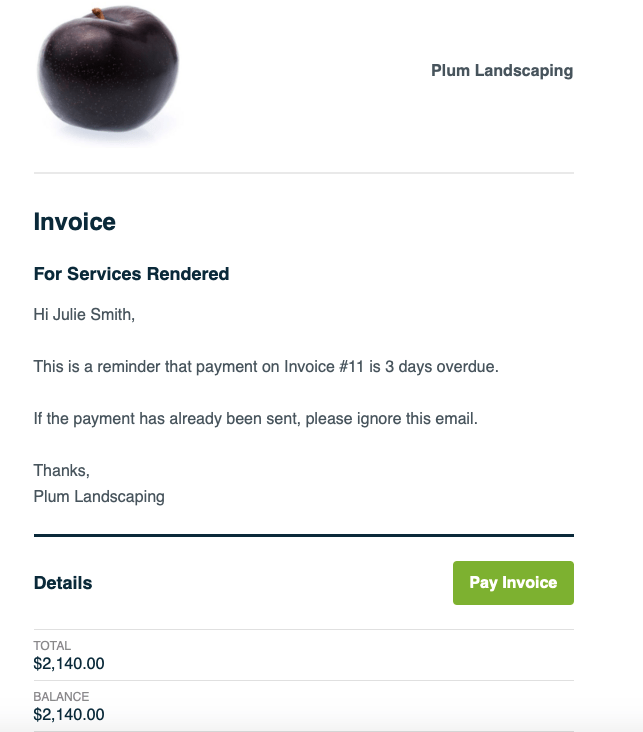
With Jobber, you can:
- Track the status of each invoice
- Automate when payment reminders are sent
- Customize payment reminder drafts
- Send friendly payment reminders via text messages or emails
Best practices for payment reminder emails
Sending payment reminder emails is an important part of managing your accounts receivable. They help you get paid and improve cash flow, all while preventing you from losing track of unpaid invoices.
But they’re only as effective as you make them. Use these tips to ensure your overdue payment reminders get the job done.
1. Make sure your client received the invoice
Before sending an invoice reminder email to your client, double-check that the invoice was sent to the correct email address and that it didn’t bounce back. If it did, try resending it to the correct address, and if that still doesn’t work, reach out to them another way.
WATCH: 10 crucial tips for writing service invoices
2. Offer multiple payment options
Provide various payment methods, such as credit card, ACH payments, or e-transfers, with clear instructions to make it easier for clients to pay you. Only offering in-person payment methods, like cash or check, makes it difficult for busy clients to find time to visit your office.
3. Be polite
Late payments are frustrating, but most of the time, customers aren’t trying to be difficult. A polite reminder and professional tone can help preserve your business’s online reputation and maintain a positive relationship with your clients.
4. Use the right communication channels
Different clients prefer different methods of communication. If your clients typically request work via email, sending friendly reminder emails is the best way to go. If they call in for work requests, a phone call or text message may be a more effective option.
Pro Tip: If you’re having trouble getting in contact with a client, try a different method. Emails, text messages, phone calls, and mailed overdue payment letters or reminders are all good options.
5. Offer assistance
Not all clients miss payments because they want to take advantage of you. Some wind up in emergency situations or with unexpected financial troubles. Others may find it difficult to pay you simply because they can’t use the payment methods you prefer.
Being patient and understanding when a customer genuinely needs a little help goes a long way in demonstrating how much you value their business. And it helps to get you paid.
For example, extend the deadline or propose a repayment plan that allows them to make installments.
6. Prevent late payments
The best way to avoid overdue payments is to prevent them from happening at all. Be sure to send clear invoices, outline payment terms upfront, and communicate with clients often to encourage them to pay on time and in full.
READ MORE: Set up recurring payment processing to prevent late payments
You can also ask for a client’s permission to save their credit card information. That way, you can invoice and bill the client once a job’s done, saving you both time and ensuring you get paid.
You can get their card on file and charge it when you have it agreed upon in writing, or you could send ’em an invoice and they can pay with a card on file.
So that’s going to expedite you getting paid, which is going to solve cashflow issues.
Just make sure to have them fill out a credit card authorization form before you do. It gives you written approval to charge their card and helps ensure you stay compliant with payment regulations.
7. Have a payment reminder strategy in place
Managing and tracking invoices, due dates, and payments is a lot of work. But it’s one of the best ways to prevent invoice payment reminders from being sent to the wrong clients or at the wrong times.
Having a clear, step-by-step strategy to follow is the most effective way to stay organized and get paid faster.
It also helps to protect you if you end up needing to escalate your payment request because it provides a clear paper trail.
Pro Tip: Use invoicing software like Jobber to make setting up a payment reminder strategy easy. It ensures every invoice is sent on time, and it can automate payment reminders for late invoices.
8. Set clear expectations
When you communicate payment expectations to customers upfront, they know what to expect. For example, do you require a deposit upfront? When should they expect an invoice? Which payment methods do you accept?
The clearer you are about how and when a client must make a payment, the more likely they are to send it on time and in full.
Handling payment reminders with Jobber
Payment reminder emails are an effective way to get paid on time and in full. But manually tracking invoice due dates, sending reminders, and coordinating payments takes a lot of time.
Invoicing software like Jobber can send invoices, automate payment reminder emails, and process payments on your behalf, while you focus on more important tasks, like growing your business.
Originally published in January 2021. Last updated on January 28, 2026.
Frequently Asked Questions
-
Yes, you should attach a copy of the client’s invoice to every payment reminder email you send. Make sure it includes an invoice number, payment amount, due date, and service description.
-
Use these tips to prevent your payment reminder emails from overwhelming customers:
• Keep your tone polite and professional
• Stick to a pre-determined reminder email schedule
• Make sure your email reminder messages are simple, short, and straightforward
• Only escalate if necessary, once all other options have been exhausted -
Email is the most common way to send payment reminders, but you can also use text messages. With Jobber, you can automate both email and text message reminders.
-
When sending payment reminder emails, avoid:
• Being vague, rude, or aggressive
• Forgetting to include important information, like the payment deadline, amount, and accepted payment methods
• Sending too many reminders too quickly
• Waiting too long to send a payment reminder -
Clear payment terms, deposits, and late fees can encourage clients to pay on time. But if your client still doesn’t pay on time, you may need to either:
• Request full payment upfront for any future work
• Try progress invoicing for large projects
• Consider firing the client