
Key takeaways:
Discover the top junk removal apps that can help your business stay organized, efficient, and ready for growth in 2026.
- Choose the right mix of tools for your needs. From all-in-one platforms like Jobber to specialist apps for lead generation, accounting, routing, and more, the best setup depends on your company’s workflow and growth stage.
- All-in-one software streamlines operations. Platforms such as Jobber centralize scheduling, dispatching, client communication, invoicing, and more so your whole team stays on the same page and you reduce admin work.
- Specialist apps deliver deep functionality. Use apps like Curb-It for on-demand jobs, QuickBooks Online for accounting, FleetSharp for GPS tracking, CompanyCam for job photos, or Slack for team messaging to solve particular operational challenges.
- Combine platforms for flexibility and efficiency. Many successful junk removal businesses use a hybrid approach, building on an all-in-one foundation and adding specialist apps as needs arise.
- Evaluate and scale with confidence. Prioritize apps that are easy to set up, integrate well, offer clear pricing, support your mobile crews, and can grow alongside your business.
For more tips and industry insights, sign up for the Jobber Newsletter. Subscribe here.
Finding the right software for your hauling business is about staying organized, efficient, and a step ahead of the competition. No single app fits every single operational model. Instead, a great workflow comes down to picking the right mix of junk removal apps for your specific setup.
This list covers one all-in-one platform (Jobber) to run your dispatching and invoicing, alongside dedicated specialist apps for lead generation, accounting, GPS routing, photo proof, automated reviews, and team chat.
Whether you’re running a single rig or managing multiple crews, mixing and matching these apps helps keep your operations tight as your company grows.
Top junk removal apps to streamline your business:
At-a-glance list
Some software options run your office from top to bottom. Others do just one job, like capturing photos or fleet tracking.
Here’s a breakdown of the best tools for junk removal businesses in growth mode, categorized by what they do best:
| App | Category | Best for |
|---|---|---|
| Jobber | All-in-one field service management | Running your entire operation under one roof |
| Curb-It | On-demand job marketplace and lead generation | Winning extra local hauling gigs to fill gaps in your schedule |
| QuickBooks Online | Accounting and financial management | Bookkeeping, overhead tracking, and tax readiness |
| FleetSharp | Fleet tracking and GPS driver monitoring | Monitoring vehicle locations and driver habits |
| CompanyCam | Field photo documentation | Storing job site photos and before-and-after shots |
| Jobber Reviews | Reputation management | Collecting Google Business Profile reviews |
| Slack | Team chat messaging | Crew check-ins and announcements |
Comparison table
Finding the right specialized tool comes down to where your business sits today and where you want it to be next year.
Here’s a summary table of how each junk removal app compares across features:
| App | Category | Best for | Business size | Key workflows | Mobile/driver tools | Jobber integration | Pricing model | Main limitation |
|---|---|---|---|---|---|---|---|---|
| Jobber | All-in-one field service management | Overall operations for growing crews | Solo operators to multi-truck fleets | Scheduling, dispatching, quoting, invoicing, and client portal | Full-featured mobile app for job details, routing, payments | Native | Tiered monthly/annual subscription plans | Extensive features take a weekend to configure |
| Curb-It | On-demand job marketplace and lead generation | Booking extra on-demand hauling jobs | Startups to small crews looking for more jobs | Viewing local jobs, submitting bids, and claiming local pickups | Mobile app for browsing nearby job posts and quoting | No | Free to join. Charges commission fee per job. | Subject to local job volume. High commission fees. |
| QuickBooks Online | Accounting and financial management | Bookkeeping, invoicing, and tax tracking | Any size business that needs bookkeeping | Expense tracking, financial reporting, payroll, and tax prep | Mobile app for receipt scanning and invoice creation | Two-way sync for customer and financial data | Tiered monthly subscription plans per feature level | Doesn’t handle route optimization, dispatching, or job scheduling |
| FleetSharp | Fleet tracking and GPS driver monitoring | GPS vehicle tracking and driver safety monitoring | Teams running 2+ trucks that need vehicle tracking | Live GPS vehicle tracking, route optimization, and driver behavior monitoring | Mobile driver app for turn-by-turn routes | Native integration to sync vehicle data and dispatches | Monthly subscription per tracked vehicle | Tracks vehicles, but lacks quoting and invoicing |
| CompanyCam | Field photo documentation | Before-and-after photos and job site notes | Small-to-large field crews | Photo capture, time-stamped project galleries, and photo annotations | Mobile app for auto-tagging photos by GPS location | Native integration to attach photos to jobs and invoices | Monthly subscription plan per user | Focuses on photo capture. Doesn’t handle route management or payments. |
| Jobber Reviews | Reputation management | Collecting Google reviews | Any business running on Jobber | Automated post-job review requests and rating tracking | Built directly into the mobile Jobber workflow | Native feature/add-on | Available as a native feature or add-on tier within Jobber plans | Tied directly to the Jobber platform |
| Slack | Team chat messaging | Quick team messaging and internal updates | Teams with 2+ workers that need quick communication | Real-time chat and file sharing | Mobile app for channel chat and field team messaging | No | A free plan is available. Tiered monthly subscription per user. | Informal chat can lead to lost job details |
All-in-one vs. specialist apps
Choosing between an all-in-one platform and various specialist apps will come down to what your business operations need help with. Are you spending too much time trying to connect multiple tools? Or are you looking to solve a specific bottleneck?
Here’s how the two approaches compare:
All-in-one field service software
An all-in-one platform (like Jobber) handles the entire lifecycle of a job, from the moment a customer requests a quote to taking card payments on site.
- Why business owners like it: Everyone on your team works out of a single app. Your dispatcher, field drivers, and accountant see the exact same job notes and payment statuses in real time. You pay one monthly bill.
- The trade-off: While it handles your daily operations, its specialized features (like vehicle telematics or advanced photo markup) might not be as impressive as a standalone tool that’s dedicated to the feature.
Specialist apps
Specialist apps focus on doing one job well, like CompanyCam for photo management or FleetSharp for GPS driver tracking.
- Why business owners like it: You get best-in-class depth for a specific workflow. If you need detailed driver safety scorecards or extensive photo annotations, a dedicated app can provide features that all-in-one software might not match.
- The trade-off: Managing five or six separate subscriptions gets expensive. Plus, if those apps don’t integrate with each other, you’ll spend more time manually copying job details from one place to another.
How to decide which route to take
The most efficient junk removal businesses often use a hybrid approach. You don’t necessarily have to pick just one way to operate.
Start with an all-in-one foundation. Build your operations around one platform to handle scheduling, client communication, and invoicing. This keeps your baseline workflow manageable.
Only layer in specialists when it’s necessary. Add single-purpose apps if your needs outgrow what your software can handle.
How we chose the top junk removal apps
You may not need software when you’re running a small crew and only doing a couple of hauls per day. But once you add a second truck and your phone keeps ringing while you’re busy, it’s easy for details to slip through the cracks.
To narrow down the best junk removal apps, here’s how we evaluated each option:
- Workflow coverage: We looked for tools that cover the essential bases of running a junk removal business, such as dispatching, route planning, photo capture, and on-site card processing.
- Mobile usability for field crews: We focused on apps with clean mobile interfaces that workers can easily navigate.
- Setup effort: We prioritized options you can set up over a weekend, so your team is up and running to start the week.
- Integrations that make sense: We checked whether these apps play connect with the software you probably rely on, like syncing QuickBooks.
- Pricing clarity: We looked for pricing tiers that scale as you add more trucks and workers to your payroll.
- Customer support: We favored companies with live chat or phone support so you have help if you run into problems.
- Fit for growing teams: We picked software designed to help expanding businesses handle higher job volume.
The result is this list of junk hauling business software to better manage your business.
1. Jobber: Best all-in-one junk removal software
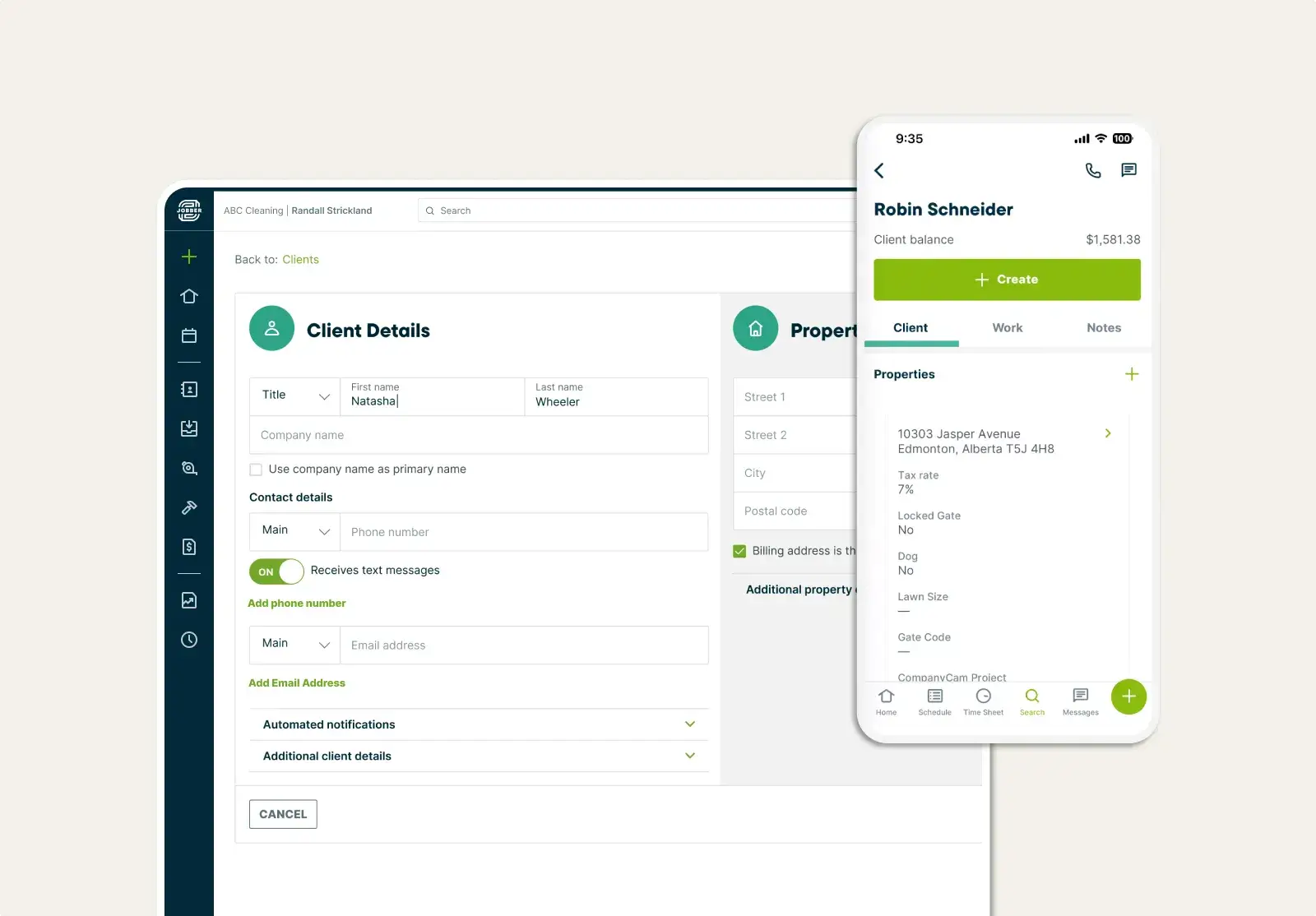
Jobber is the best app for junk removal businesses looking to improve every aspect of your business.
When we adopted Jobber in 2017, that’s when we became a real business.

Once jobs are in your calendar, you can easily assign your crews, thanks to Jobber’s multiple calendar views. Last-minute rescheduling is even easier with a drag-and-drop calendar. From there, Jobber helps you automatically create the fastest, most fuel-efficient routes for your crew.
Jobber’s junk removal software also helps you:
- Manage your customer history and contact details from one field service CRM.
- Create and send professional quotes in just a few clicks.
- Stay connected with your customers with automated reminders about scheduled waste removal and updates when the job is over.
- Save time on scheduling by letting leads and customers upload photos and book junk pickups online.
- Advertise your junk removal services with professional, branded email campaigns.
- Offer convenient payment options to your customers to get paid on the spot or online.
- Create job checklists to ensure quality customer service every time.
- Track crew member time on every job for more accurate payroll.
- Efficiently manage scheduling and dispatching with less stress and effort.
- Use GPS tracking to see where crews and trucks are in real time.
- Turn finished jobs into invoices automatically.
- Use Marketing Tools to figure out what to promote and when, and create content that fits your business.
Check out Jobber’s website for pricing.
You need to start on Jobber immediately.
If you get on Jobber, everything’s collectively organized… Everything’s right there in front of you. You can send invoices, you can take payments, the whole nine.

2. Curb-It: Best junk removal job app
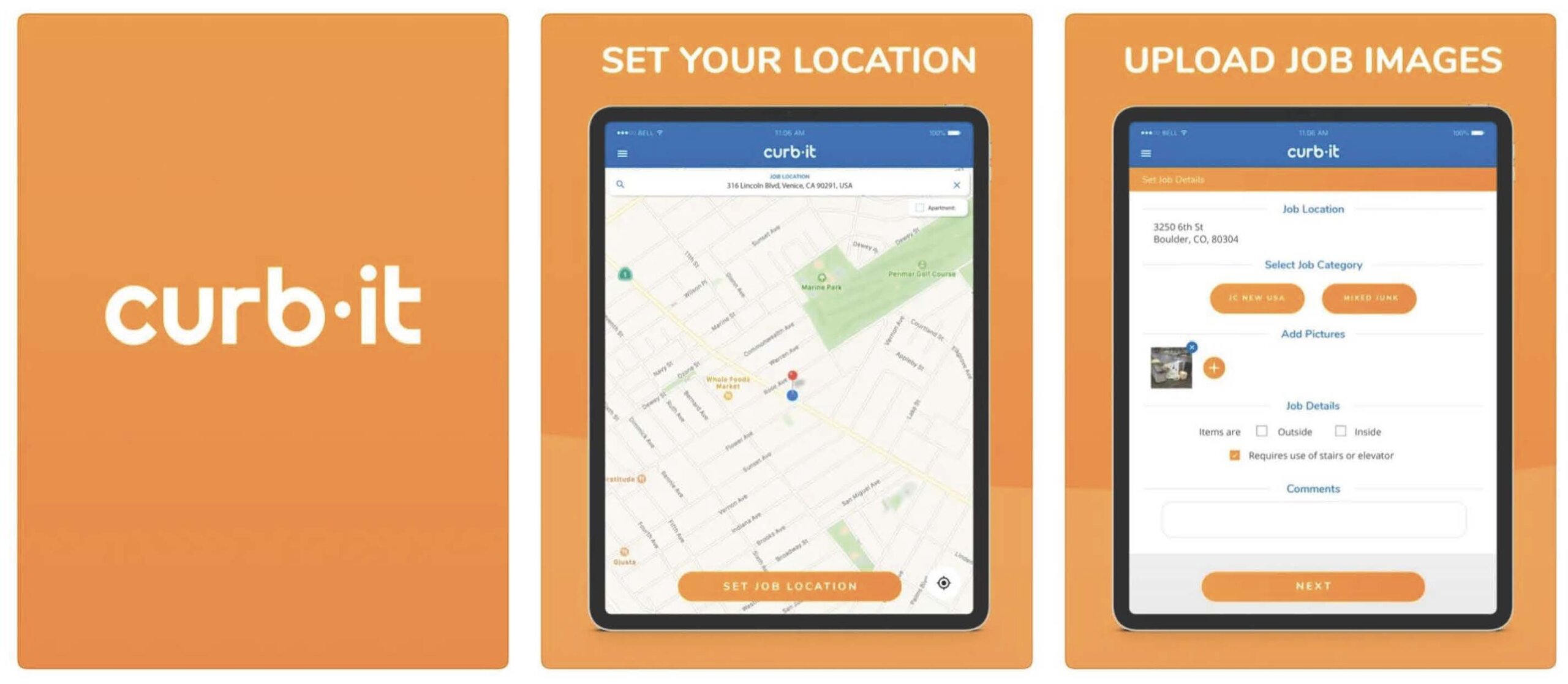
Curb-It is an Uber-like service that connects potential customers and junk hauling pros. It’s largely a tool for lead generation and job discovery, helping you catch overflow work and book pickups while you’re on the go.
To get started, sign up with your junk removal company name and select the territories you service. You’ll then be notified of junk removal jobs within those specific regions.
Once you receive a notification for a potential job, you can price the junk removal job for the customer to accept. Responding quickly with an accurate, fair price will improve your chances of getting the job.
If a client is satisfied with your junk removal services, they’re more likely to contact you directly for future pickups than to use the app again. This makes Curb-It a great app for new trash removal companies looking to build a loyal customer base.
It’s free to sign up for Curb-It, but they charge a small platform use fee for every job you complete.
Job volume can also vary wildly depending on your market. And since the customer gets to pick the winning bid, you’re often competing on price against other junk haulers.
3. QuickBooks Online: Best for accounting
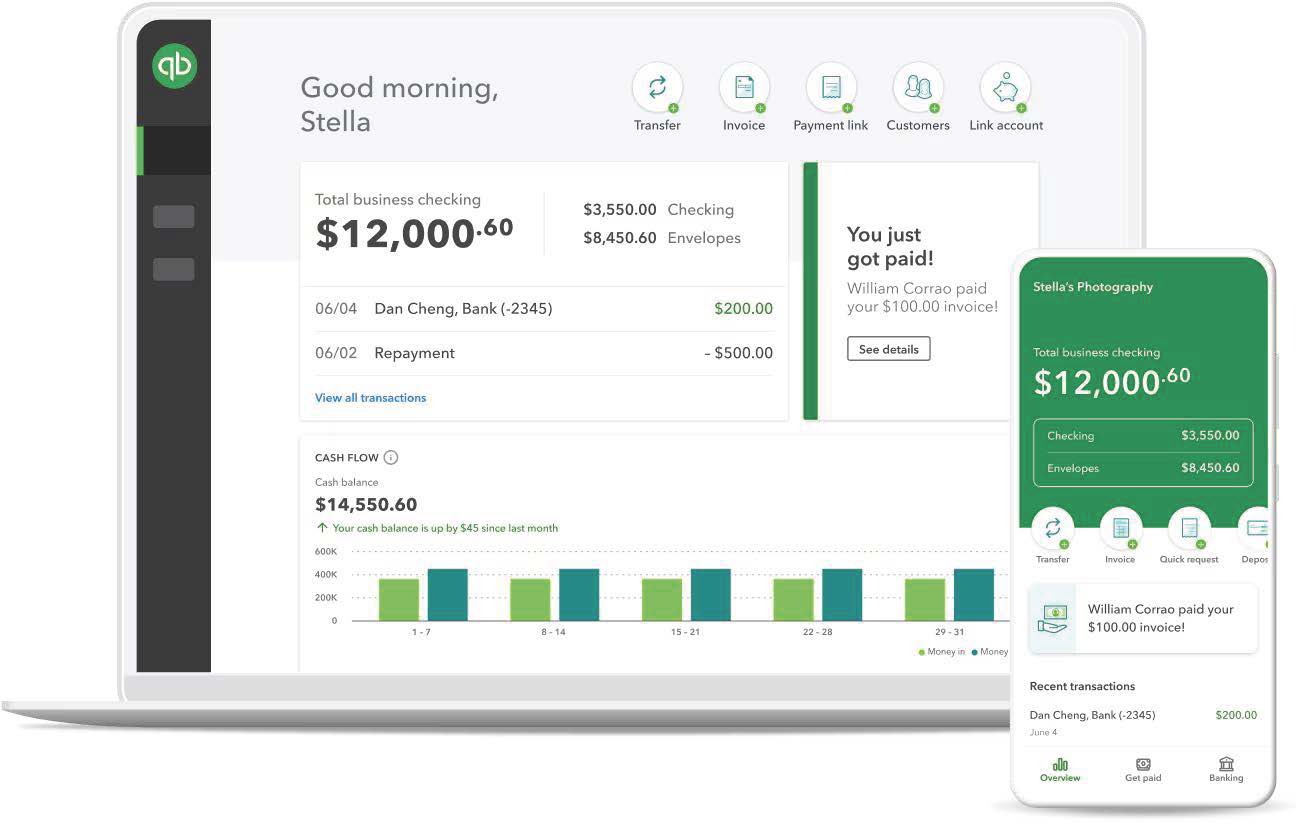
QuickBooks Online is the best accounting app for junk removal businesses, thanks to its versatility and ease of use. It acts as your financial command center, taking the headaches out of everyday bookkeeping.
Use junk removal invoicing software like QuickBooks Online to organize your finances. It helps you track expenses, simplify invoicing, and manage payroll from a single solution. It also lets you:
- Automatically link expenses to invoices.
- Generate detailed reports to track the success of your business.
- Snap photos of receipts on your phone and organize them in QuickBooks.
Better yet, QuickBooks Online integrates with many of your favorite tools to connect your workflows and strengthen its accounting features.
For example, with Jobber’s QuickBooks Online integration, you can easily sync your customer information, timesheets, invoices, and more automatically between Jobber and QuickBooks. This makes it easy to manage your business from one place.
Keep in mind that QuickBooks Online is strictly an accounting platform. It won’t handle route optimization, scheduling, or dispatching. You’ll still need another app to manage your daily field ops.
Check out the QuickBooks Online website for pricing.
4. FleetSharp: Best junk removal driver app

Use FleetSharp to manage your junk removal fleet and improve overall efficiency for your drivers.
If you manage multiple crews, you can use FleetSharp for efficient junk removal route planning to cover more jobs in a day. When last-minute junk pickup jobs come in, you can dispatch the nearest driver to get to the location right away.
With the FleetSharp app, you can:
- Track the exact location of your vehicles in real time.
- Optimize routes to minimize travel time and fuel consumption.
- Track driver behaviors such as speeding, idling, and harsh braking.
Plus, using the Jobber and Fleetsharp integration can help you create the ultimate junk removal driver app.
Check out FleetSharp’s website for pricing.
5. CompanyCam: Best app for job photos
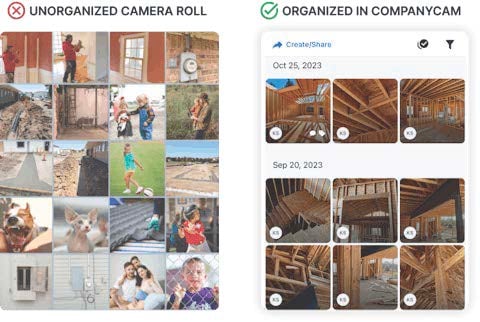
A photo-sharing app such as CompanyCam lets you capture and manage before-and-after documentation of junk removal jobs.
CompanyCam stores your photos in one place, organizes them by date and location, and allows your team to add notes about the job to the photos.
Storing photos on CompanyCam allows you to ensure that your junk removers are always performing quality work. It also keeps a record of jobs in case of customer complaints or disputes.
CompanyCam integrates with Jobber to allow you to share photos with your customers on jobs and invoices. This also keeps photos tied to specific jobs in your junk removal CRM.
Check out CompanyCam’s website for pricing.
6. Jobber Reviews: Best app for reviews
Asking customers for reviews is one of the best ways to market your junk removal company on Google, but it’s easy to forget with a busy schedule. Jobber Reviews streamlines this process to ensure that you follow up with every satisfied customer.
Instead of relying on your drivers to ask for feedback after a job, Jobber Reviews sends automated text or email requests when a job is marked complete or an invoice is paid.
After paying their invoice, those customers will automatically get a direct link to leave a review on your Google Business Profile.
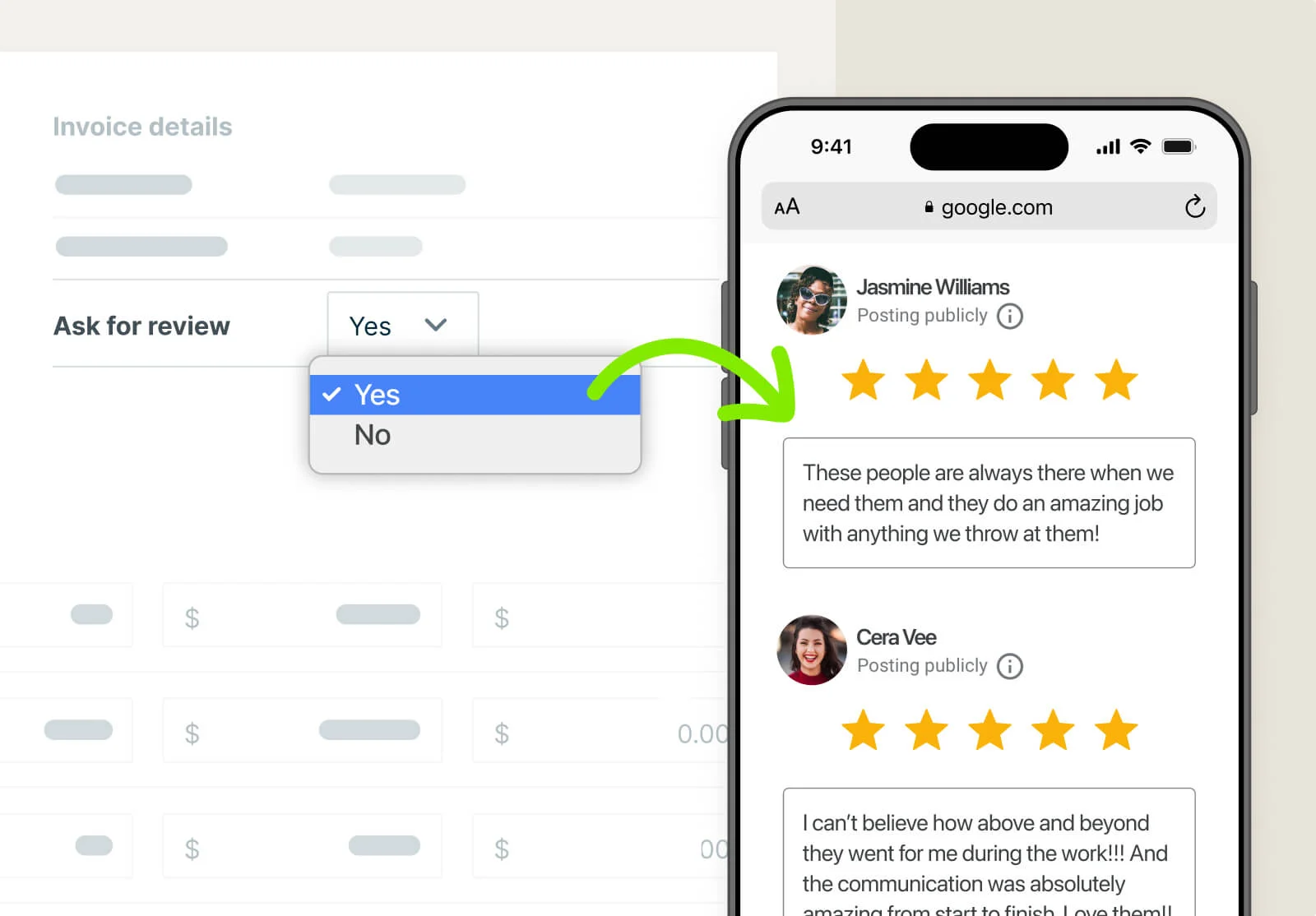
From your reviews dashboard in Jobber, you can keep an eye on your average Google rating. You’ll also see your latest reviews and resources on how to manage your junk removal business’s reputation.
Because it’s built directly into the native platform, you don’t need to pay for other third-party reputation tools or deal with complicated software integrations. Everything lives inside your primary setup, keeping your software organized.
Jobber Reviews is available as an add-on to most Jobber plans.
Pro Tip: Ask your customers to include your crew’s name in the review.
It creates a nice personal touch—anyone reading the review feels like they know who’s working on the job.

7. Slack: Best app for team communication
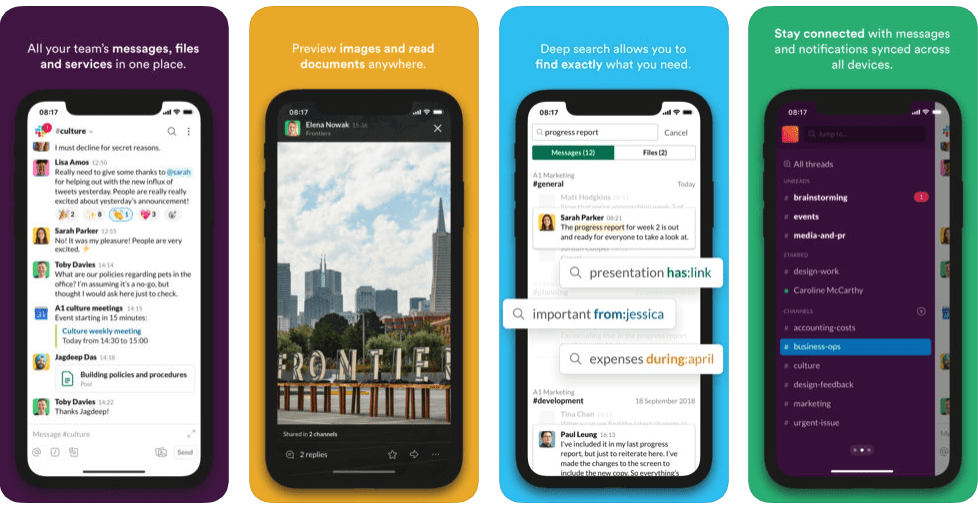
Slack is a team communication app that keeps your junk removers connected, whether they’re in the office or out in the field.
It’s a great virtual breakroom for team banter or emergency dispatch updates. You can send photos, documents, and quick messages to keep everyone up to date.
You and your crew can easily coordinate job assignments and share updates through channels. These channels allow you to order conversations based on clients, crews, areas, or however else you prefer to organize your business.
However, it’s easy for important notes to get lost in chat threads if you aren’t careful. That’s why job details, customer history, and invoices need to live in your dedicated field service platform, not within Slack.
Check out Slack’s website for pricing.
How to choose the right junk removal apps
The best apps for your business depend on your specific needs, like better junk removal scheduling, smoother invoicing, or anything in between.
This largely depends on the type of junk removal business that you operate—whether it’s full-service junk hauling or focused on specific services. For example:
- A commercial junk removal business deals with larger volume, meaning you’d have a larger team. You’d want to prioritize a junk removal scheduling app with team communication features.
- Services such as event cleanup or dumpster rental dropoff and pickup require more communication with clients, so you’d want a waste removal app with communication features like automated messaging or two-way texting.
- If you offer a recurring service such as weekly doorstep recycling, you’d benefit from junk removal business software that allows for recurring invoicing and automatic payment collection.
If you need to connect multiple workflows, starting with an all-in-one platform is generally your best move.
Checklist for vetting junk removal apps
Once you know which operations take priority for your business, use this checklist to evaluate the tools before you commit to one:
- Lock down must-have workflows. Confirm that the tool manages volume-based quotes, dispatch mapping, on-site payments, and instant invoices.
- Test mobile field ease. Make sure your drivers will be able to easily view job details, upload photos, and collect signatures.
- Assess crew adoption effort. Pick junk hauling software that your team can master over a single weekend. It shouldn’t be so complex that you need to suspend your operations to train everyone.
- Audit integrations. Ensure smooth data sync with tools like QuickBooks Online to eliminate manual double-entry.
- Calculate total costs. Watch for hidden fees per user, surcharges for trucks, or annual contracts that spike your bills as you add crews.
- Test support responsiveness. Pick vendors that offer live phone or chat support during your crew’s hours, so you aren’t left stranded on a job.
- Verify data ownership. Confirm you can export your customer database and job history anytime.
- Ensure room to scale. Choose software that can handle extra trucks, multiple dispatch boards, and higher job volume.
Run your junk removal business with less admin
Bringing the right tools into your daily routine is how you take back control of your day. Job details are easily accessible, your crews move efficiently between dump runs, and your customers stay happy with updates.
Whether you need quick before-and-after photo tracking or automated driver routing, pairing a specialized app with a central system keeps the work organized as you take on more jobs.
For growing junk removal companies looking to streamline everything under one roof, Jobber is the practical, all-in-one software to manage your operation.
By combining the right junk removal apps, you can cut down on any after-hours admin work and keep your business growing smoothly.
Originally published December 2024. Last updated September 30, 2026.
Frequently Asked Questions
-
Many business owners say that the best overall junk removal management software is Jobber. It eliminates the need to juggle different apps to complete a job, giving growing crews a single platform to handle:
• Online booking
• Volume-based quotes
• Driver dispatching
• On-site card processing
• Invoice tracking -
An all-in-one platform like Jobber is usually a smart move for growing teams. It helps keep your dispatching, accounting, and crew management data on the same page. Relying on separate tools for every workflow can lead to job notes getting lost and higher software bills. That said, you can always add in a specialist tool if a specific bottleneck comes up.
-
While free platforms don’t exist for full operations, tools like Curb-It are free to join upfront. However, they charge a fee for every job you bid on and win.
For core operations, most major platforms offer free trials. Jobber, for instance, offers a 14-day free trial so you can test-drive scheduling, routing, and invoicing. -
A dedicated junk removal route planning app like FleetSharp works great for vehicle tracking, but many drivers rely on the route optimization features built into their primary management tool.
Jobber, for instance, automatically reorders daily stops on your crew’s mobile app to save fuel. It also sends instant push notifications when there’s a last-minute change to their schedule.