
Key takeaways:
Designing an effective pest control website is key to attracting and converting customers in a competitive market.
- Prioritize user experience (UX) and simplicity. Ensure your site is clean, uncluttered, easy to navigate, loads quickly, and works well on all devices—especially mobile phones.
- Use strong branding and professional visuals. Consistent colors, logos, quality images, and videos increase trust and help your business stand out.
- Incorporate SEO strategies. Use relevant keywords, optimize on-page elements, and create dedicated service pages to rank higher in search results and draw more local leads.
- Clearly list services and service areas. Display every type of pest you treat and highlight your service locations with maps and lists to avoid confusion and attract the right customers.
- Build credibility with trust signals. Include customer reviews, testimonials, industry credentials, awards, and your license number to reassure clients and demonstrate professionalism.
- Make contacting and booking simple. Add visible contact details, click-to-call buttons, and streamlined online booking or request forms on every page for a seamless customer experience.
- Follow a straightforward website creation process. Register a domain, choose a website builder, customize your design, add essential pages (home, services, about, testimonials, contact), and track performance with analytics.
Want more insights to help your service business grow? Sign up for the Jobber Newsletter.
Building a website that brings you leads is a challenge. After all, you’re an expert in pest control, not web design.
Whether you’re just starting a site or want to improve an existing one, learn the elements of effective web design for pest control to look professional and attract customers.
You’ll see examples of successful pest control sites, then get steps on how to build your own.
Good pest control website design makes it easy for customers to trust you and book you. Your site should list every pest you treat, show your service areas, and display your license number and real reviews. Add a click-to-call button and an online request form, and make sure the site loads fast on phones.
How to design a great pest control website:
-
Prioritize user experience (UX)
-
Use effective branding and visual elements
-
Incorporate SEO strategies
-
List your service offerings
-
Show your service areas
-
State your unique selling point
-
Build trust and credibility
-
Make it easy for customers to request work
-
How to make a pest control website from scratch
1. Prioritize user experience (UX)
Ever landed on a website and felt completely lost? Maybe the menu was all over the place, or you had to dig through endless pages just to find a phone number. That’s the last thing you want.
Web design for pest control should be as straightforward as your best pest treatment plans: clear, targeted, and efficient.
Your visitors, even if they’ve only spotted a few ants in the kitchen, want answers fast. And if your site doesn’t make things easy, they’ll turn to a competitor who does.
Keep the design simple
Keeping your website design simple makes it easier for potential customers to find the information they’re after. A cluttered or outdated website can make your business appear lazy or untrustworthy.
For example, Baxter Pest Control uses a Jobber website (included with every Jobber plan) that cleanly presents their contact information and service area at the top of the page.

They only use two main images, and don’t clutter their site with lots of text, pop-ups, or buttons.
To keep your design simple:
- Avoid stuffing too much information onto one page
- Break up sections of text using headers with larger font sizes
- Use clear labels like “services,” “about,” or “contact us” in your navigation menu
- Use white space and separate pages (such as one page for each service you offer) to avoid overwhelming visitors
Important business information, like your services, service areas, and contact details should be easy to find. Not every customer will be tech savvy, so make their life easy by placing this information front and center, and on multiple pages.
Ensure fast page loading speeds
If your site takes longer to load than it does for a cockroach to scurry under the fridge, you’ve got a problem. Every second of delay makes it more likely that visitors will leave. Keep things running smoothly by:
- Compressing images (large files slow things down)
- Using a reliable hosting provider
- Avoiding excessive animations or unnecessary design elements
Make it usable on phones
Because many of your customers will find your website from their smartphones, it’s just as important that your website looks good on mobile devices.
To be mobile-friendly, your website should:
- Automatically adjust to fit the screen size of any device
- Load quickly on mobile devices
- Have buttons and links that work when visitors tap on them
- Show all images that normally appear on a full-sized screen
- Have a click-to-call button at the top of every page so people with an urgent pest problem can reach you in one tap
2. Use effective branding and visual elements
Strong branding and professional visuals make your pest control business stand out and build customer confidence.
Here’s how to make those elements attract and convert customers.
Use your service branding consistently
Your service branding is how your business looks and feels—that includes the colors, images, fonts, and writing style you use.
Keeping all these elements consistent makes you look professional and your business more memorable.
The Jerry’s Pest Management website has a unique style that they use across all their pages.
Their brand elements include a memorable spider-shaped logo, an illustration of the business owner, and pops of green for buttons and text that they want visitors to notice.

Add high-quality images and videos
Visuals help people understand your services and see the value you provide. Include non-blurry, professional images of:
- Your team in action
- Before-and-after results of pest control jobs
- Videos explaining your process
Engaging visuals not only look great but they also help customers feel confident that you know what you’re doing.
3. Incorporate SEO strategies
To generate the most leads for your pest control business, you need to appear at the very top of the search results page when a prospective client searches for your services.
That’s where SEO (search engine optimization) comes in. A well-optimized site helps you climb Google’s rankings so that when someone searches for “termite removal near me,” your site is the one they click on.
Follow these steps to optimize your site for search engines.
Brainstorm a list of pest control keywords
Figure out the keywords, phrases, or questions people are typing into search engines to find pest control services like yours.
The goal is to have your website appear at the top of the results when people search those keywords.
Here’s how to find the right keywords:
- Use Google’s autocomplete. Start typing phrases like “bed bug removal” or “pest control for…” and see what pops up.
- Check Google’s “People also ask” section in the middle of search results for real questions people have asked. These may contain keywords.
- Use keyword tools like Ahrefs, SEMrush, etc. to get data on search volume (how often a keyword is searched per month) and how competitive the keywords are.
- Think local. If you serve a specific city or region, include terms like “[REGION] exterminator” or “pest control service in [CITY].”
Pro Tip: A bit of keyword research can help you determine which words or phrases best describe your business or service offerings.
Search all your brainstormed keywords in Google and see what comes up. Take note of the types of pages that show up and how you can make yours better.
READ MORE: Pest control SEO: 9-step guide to attracting customers online
Optimize on-page elements to make your site search-friendly
Finding the right keywords is half the battle. Now, you need to place them strategically throughout your site without forcing them or sounding robotic.
Here’s how pest control websites should optimize for search engines (and humans):
- Work the keywords naturally into your content: This includes pages like your homepage, service pages, and even blog posts.
- Optimize your title tags and meta descriptions: Every page needs a unique, compelling title and description that includes your main keyword.
- Use headings: Break up your content with headings that include relevant keywords. This improves readability and SEO.
- Create alt text for images: If you upload pictures of your team in action or before-and-after shots of an infestation, describe them using keywords like “termite damage repair in [CITY].”
- Link to other internal pages: Link to other pages on your site to keep visitors engaged and guide them to important information. For example, you could place a link within a blog post about termite prevention that points to your termite treatment service page.
4. List your service offerings
When a potential customer lands on your website, they want one thing: to know if you can solve their pest problem. Whether they’re dealing with a wasp infestation or rodents in the attic, your site should make it clear what services you provide.
The best pest control websites don’t leave visitors guessing. They highlight their services in an easy-to-find way that guides people toward booking an appointment.
ZAP Pest Control immediately shows what services they offer. On their homepage, each pest they deal with is displayed on an image tile. Clicking a tile opens a separate page with more information about that type of pest.

You could just write your services in bullet points, but this is a more creative and eye-catching approach.
Pro Tip: Having separate pages for each service is also great for your search engine optimization (SEO). It tells search engines that you have some knowledge of these different topics, and it can help you appear higher in search results.
READ MORE: 12 ways you should be marketing your pest control business
5. Show your service areas
Have you ever gotten excited about a message from a potential client, only to realize they’re way outside of your service area? That’s why your website needs to be clear on which areas you service.
Parker Eco Pest Control has both a list of locations and a custom-designed map. The list is organized alphabetically so visitors can quickly find their community.

You can include a map or a list, but using both makes the information easier to process.
If you have locations in more than one city, consider adding an interactive Google Map with a pin for for each location. You can easily do this with many DIY website builders, like WordPress or Wix.
6. State your unique selling point
Set yourself apart from other pest control businesses by telling customers what makes yours special. Try to come up with a one-sentence statement—this is your unique selling point (USP).
B&C Pest Control tells potential customers right away that they only need a pest control treatment once a year. At the top of their homepage, the company guarantees a long-term solution to pests.

If you aren’t sure what your competitive difference or unique selling proposition (USP) is, look at the feedback customers have given you. (Start sending out customer feedback surveys if you don’t have enough feedback!)
7. Build trust and credibility
When people look for a pest control service, they want to be sure they’re hiring a company they can trust. A professional, well-structured website helps do that by showcasing your experience, credentials, and happy customers.
Web design for pest control should focus on making your business look reliable, approachable, and knowledgeable. Here’s how to do it:
Introduce yourself on an About page
When potential customers want to learn about your business, one of their first stops is your website’s About/Team page. This helps them get to know you, understand who you are as a business, and why they can trust you with their pest control issue.
Eco Friends Pest Control has a detailed Team page. Each team member has a bio with their qualifications and their approach to pest control. This shows customers there are trustworthy experts working there.
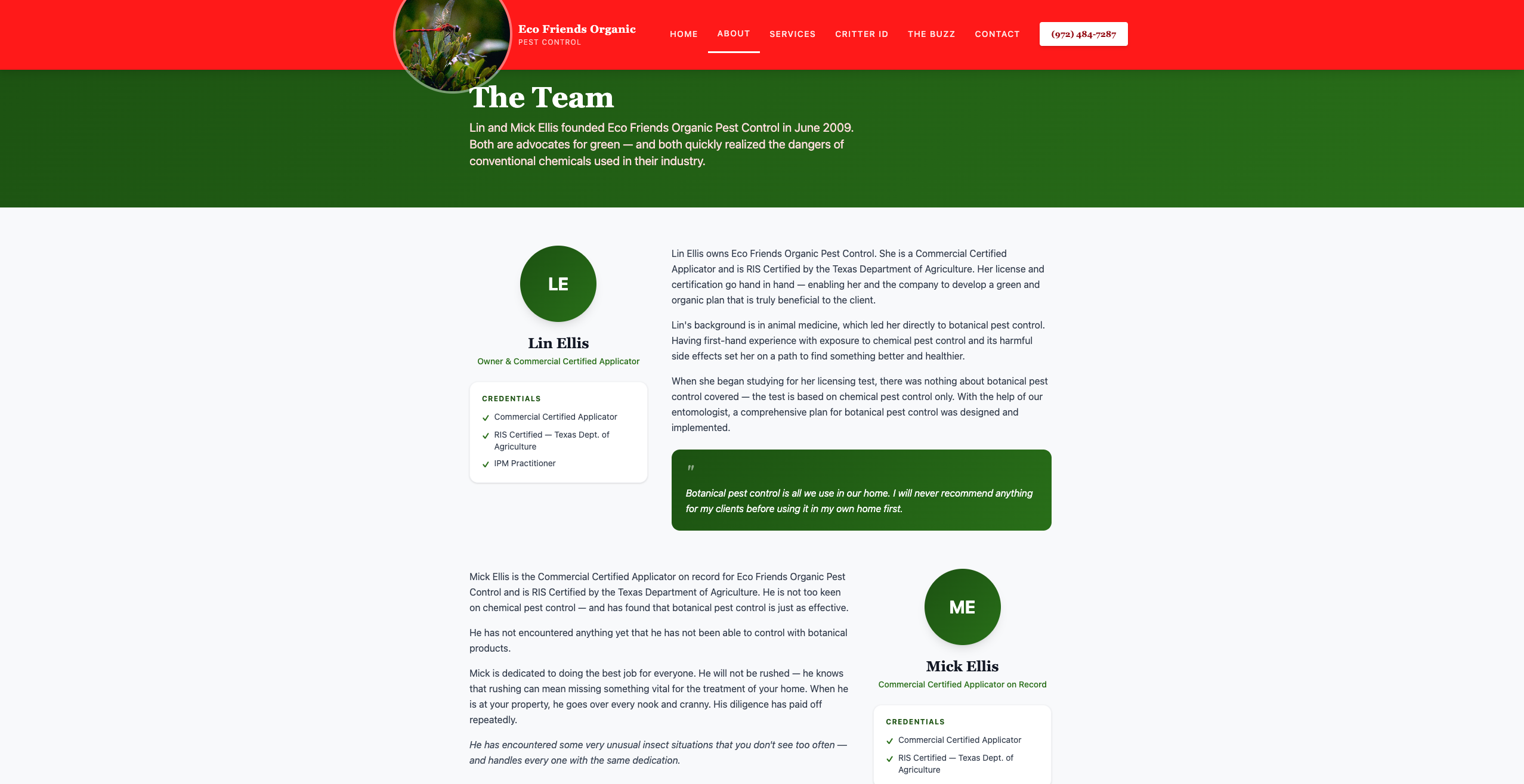
Eco Friends also tells the story behind the red dragonfly in their logo, which has a deeper meaning for their business and their industry.
Refer to the company overview section of your pest control business plan and try to answer these questions.
- Who are you as a business?
- Why did you get into pest control?
- What beliefs drive you?
- What sets you apart from every other pest control company out there?
Pro Tip: Include photos of you and your team. Your future clients like to see who they’ll be working with, and a photo helps them recognize you when you get to their property.
Try to take a photo with a neutral background and wear a clean shirt with your logo on it.
Show reviews from happy customers
Including positive reviews, testimonials, and awards right on your website shows potential customers they can trust you to do great work.
Bye Bye Mosquito Guy shows a list of customer reviews from Google at the bottom of their homepage.
To keep fresh reviews coming in, Jobber’s automated review requests ask happy customers for a Google review after you finish the job.

Get ‘Em Out Wildlife has an entire page dedicated to five-star testimonials. Visitors can check out their Google reviews or even leave their own review directly from the page.

The page also lists several recent awards, which tells visitors they can expect award-winning service.

Pro Tip: If you have plenty of happy clients, film a series of video testimonials and share them on your website.
You don’t need fancy equipment, either. Just shoot the video on your own and use a free editing app to get your video just the way you want.
Display certifications and awards
Certifications and industry awards show customers that you’re a qualified professional. Highlight on your website whether you’re licensed, bonded, or a member of a professional pest control association.
Badges from organizations like the National Pest Management Association (NPMA) or local business awards can make a strong impression. Consider placing these credentials in your website footer or on a dedicated certifications page.
Show your license and safety details
Homeowners want to know who’s treating their home and what’s going into it. Put your trust details where people find them fast, like your homepage, footer, or service pages.
Include:
- Your state pesticide applicator license number
- Pet- and kid-safe treatment info, including how long to stay off treated areas
- Your service guarantee, like free re-treatments between visits if you offer them
- Your prevention-first approach, such as sealing entry points before you spray
Check your state pesticide regulator’s rules on where to show your license number. Clear safety details answer customer questions before they have to ask.
8. Make it easy for customers to request work
A simple quote request form lets visitors ask for a one-off treatment or removal without picking up the phone. Ask for their name, contact details, address, the pest they’re dealing with, and an ideal timeline.
With those details up front, you can send an accurate quote faster and get the job on the schedule.

Just don’t ask customers for too much information—they might get impatient. Everything you ask for should have a purpose.
To make the experience feel easier for customers, collect their information using an online booking system, like Jobber, that breaks the form up into multiple steps.
Using Jobber, you’ll also get customer requests booked right into your calendar. Once you set your availability and service offerings in Jobber, customers can select a date and time slot and book an appointment.

To help you stay in control of your schedule as you accept bookings from your website, Jobber lets you customize your online booking preferences. Here’s how:
- Choose the services your customers can book online, and show them what each service includes, how long it will take, and the estimated price
- Choose which team members are available for bookings and what hours they’re available
- Set your earliest availability and add buffer times between appointments
- Set a maximum drive time between appointments
Put your contact information on every page
Having your contact details front and center makes it easier for visitors to reach you. Include multiple ways to contact you, like phone, email, and an online booking form.
On the All Pest Services website, the company puts their contact information at the very top of every page (in their header):

Visitors can click the big red “Request a Callback” button to fill out a contact form, or they can contact the company by phone or email. They’ve also included social media icons linking to their Facebook and Twitter pages.
These are all effective ways to encourage visitors to contact you. Consider how your current clients like to connect, then prioritize and share your contact details accordingly.
How to make a pest control website from scratch
A professional website is essential for attracting customers and growing your business. Whether homeowners are dealing with mice, or businesses need routine pest management, they’ll likely search online for a service.
Building a site from scratch might seem overwhelming. But with the right approach, you can create one that highlights your expertise and encourages visitors to book your services.
Follow these steps to get started:
1. Register your domain name
Your domain name is the main link that your website uses (e.g. pestfighterstennessee.com).
Use a domain name registrar like GoDaddy to find an available one and get it registered. Some website-building services will help you set up your domain name while you start creating your site.
Remember: You’ll need to renew your domain name registration every one to 10 years, depending on the term you choose.
2. Choose a website builder
No need to hire an expensive agency to create a professional website. Use a website builder like Wix or WordPress—they offer pre-designed website templates to get you started quickly.
Or get your business online and in front of customers fast with a simple, professional website, you can set up in minutes.
Simply provide Jobber with details on your pest control business and services, and we’ll create a website that highlights what sets you apart from the competition.
3. Customize your pest control website design
Once you’ve chosen a website builder, pick a template or theme that best suits your small business.
For instance, are you a veteran and want to use military themes to talk about pest removal? Choose colors, fonts, and background images that match that.
Then customize your website’s design by adding your logo and crew photos to every page.
4. Add the essential pages
To make a helpful, functioning website, you need to build these pages:
- Homepage: Create a homepage that gives visitors the information they’re looking for as soon as they land, including who you are, what you do, and how they can contact you.
- Service pages: These describe what pest control services you offer.
- Location pages: Pages that say what areas you service can help customers find you when they search for exterminators in their specific city, town, or county.
- About: Your ‘About’ page tells customers about who runs your business, what your mission is, and what makes it unique. Include your experience, licenses, certifications, awards, accreditations, company values, and beliefs.
- Testimonials and reviews: Use your testimonials page to share reviews customers have left on your Google Business Profile or social media pages.
- Contact: Create a page with all your contact information so customers can book your services or ask questions. Include an email address, phone number, and online booking form.
5. Track your performance with Google Analytics
Monitoring your performance with Google Analytics tells you how customers are finding you, and how many are visiting your pest control website.
Sign up for Google Analytics by following the prompts. Then add the tracking code to your website to start measuring your results.
READ MORE: How to create a website for your service-based business
Now you’re ready to design your own site. You can make a DIY site with services like Wix or Squarespace, or hire an agency or freelancer that offers website design services.
No matter how you build your site, use the tips in this article to attract more visitors, convince them you’re the best in the business, and book more work.
Originally published in April 2021. Last updated on November 4, 2026.
Frequently Asked Questions
-
It depends on who builds it. DIY website builders typically charge a monthly fee, and you handle the setup yourself. Agencies cost more because they take care of design, writing, and upkeep. As one example from the market, some agency plans can run around $500/month. If you use Jobber, a Jobber website is included with your plan.
-
Start with five core pages: a homepage, services, service areas, About, and contact. On your services page, give each pest you treat its own section. Add a reviews page and a page for your license, safety details, and guarantees. If you sell recurring plans, like quarterly treatments, give them their own page so customers can compare options.
-
Build your own if you want to keep costs low and you’re comfortable spending a few hours on setup. A website builder with ready-made templates gets you online fast. Hire an agency or freelancer if you’d rather hand off design, writing, and search engine optimization. Either way, check that the finished site covers every tip in this guide.
-
Make it easy to reach you. Put a click-to-call button and a short request form on every page, then answer new requests fast. Next, help people find you. Make sure you get your business listed on Google, ask happy customers for reviews, and use local pest keywords on each service page.