
Key takeaways:
Explore the top apps for painting contractors in 2026 to boost efficiency, organization, and growth in your business.
- Comprehensive solutions simplify daily tasks. All-in-one apps like Jobber centralize scheduling, quoting, invoicing, and client communications, letting you run your business more smoothly and improve customer experiences.
- Specialized tools address key business needs. Whether you need better accounting (QuickBooks Online), GPS tracking for crews and vehicles (FleetSharp), or effective communication (Slack, Google Workspace), there’s an app to streamline each part of your workflow.
- Color visualization and matching apps close more jobs. Tools like Paint Color Visualizer, Paint Tester, and Benjamin Moore Color Portfolio help you and your clients confidently choose and preview colors, resulting in more polished estimates and greater customer satisfaction.
- Marketing and lead generation are made easier. Apps such as Jobber Campaigns, Jobber Reviews, Canva, Nextdoor, and Angi help you market smarter, collect reviews automatically, design high-quality materials, and find local clients with less effort.
- Choosing the right mix depends on your business goals. Assess your biggest challenges—operations, finance, communication, or marketing—and select apps that fill those gaps, ensuring you invest wisely as your business grows.
Want more tips to stay ahead of the curve? Sign up for the Jobber Newsletter for monthly advice and resources: Get the Jobber Newsletter.
The right painting contractor app can help you get more organized, wow your customers, and find more painting jobs.
However, finding these apps can feel like a scavenger hunt. Where do you even start? And how can you be sure you’ve picked the right one for your business?
Luckily, we’ve done the heavy lifting for you. We’ve rounded up 15 of the best apps for painting contractors, so you can skip the hassle and dive right in.
Looking to supercharge your estimates and get paid faster? Need a quick way to find jobs or the perfect paint shade? This list has all the tools you need.
Best software for painting contractors:
Best apps for painting contractors (comparison table)
Disclaimer: Software prices are subject to change after publication.
| App | Best for | Key features | Why it’s best for painting contractors | Limitations | Starting price |
|---|---|---|---|---|---|
| Jobber | Painting contractors needing an all-in-one solution | • Drag-and-drop scheduling • Route optimization • Quote to invoice conversion | Streamlines your business by centralizing all of your workflows | No built-in inventory management | Starting at $29 per user per month |
| QuickBooks Online | Managing accounting workflows | • Custom invoice creation • Expense tracking • Payroll management | Simplifies bookkeeping and makes it easy to track job costs and profitability | Advanced features only available in higher-tier plans | Starting at $19 per user per month |
| Fleetsharp | GPS and mileage tracking | • Real-time GPS tracking • Route optimization • Fuel and mileage tracking | Manage multiple crews more efficiently | Focused primarily on fleet and vehicle management | Must contact for pricing |
| Google Workspace | Cloud file storage and collaboration | • Custom business email address • File storage • Google Calendar scheduling | Centralize communication, file storage, scheduling, and client messaging in a cloud-based system | Not designed specifically for painting or field service businesses | Starting at $9.20 per user per month |
| Slack | Remote communication for painters | • Separate channels for crews, projects, clients • Voice and video calls • Upload photos and documents for easy reference | Keep crews connected across multiple job sites with simplified communication | Not built specifically for painting contractors | Free plan, then $8.75 per user per month |
| Profit Margin Calculator | Calculating profit margins | • Operating profit margin calculator • Gross profit margin calculator • Bet profit margin calculator | Quickly determine whether a job will be profitable by simplifying pricing, markup, and cost calculations | Focused only on profit margin calculations rather than full estimating or accounting workflows | Free |
| Paint Color Visualizer | Room visualizing | • Photo-based color matching • Augmented reality paint preview • Color palette recommendations | Improve sales and customer confidence by showing realistic digital previews of paint colors on walls | Primarily designed around Sherwin-Williams paint products | Free |
| Paint Tester | Room visualizing | • Smart Paint Bucket tool • Built-in color picker • Digital room mockups | Create polished estimates by providing simple, realistic room color previews | Only available on iOS devices | Free |
| Benjamin Moore Color Portfolio | Matching paint colors | • Thousands of Benjamin Moore paint colors available • Video and visualization tools • Storage for different project palettes | Simplify color matching by providing realistic digital previews and fast access to thousands of paint colors | Primarily focused on Benjamin Moore paint products and color systems | Free |
| Jobber Reviews | Reputation management | • Automatic review requests • Google review monitoring • Review requests in invoices | Build a stronger online reputation by automating Google review requests | Primarily focused on Google reviews | Jobber add-on |
| Jobber Campaign | Email marketing | • Pre-built email templates • Customer segmenting • Email status tracking | Generate repeat business and stay top-of-mind with customers | Focused primarily on email marketing rather than broader marketing campaigns | Jobber add-on |
| Responsibid | Sales process automation | • Multiple ways to send estimates • Online scheduling • Automatic follow-up emails | Win more jobs with clear insights into your sales pipeline | Focused primarily on sales and lead conversion rather than full business management | Free, then $179 per month |
| Canva | DIY graphic design | • Ready-made marketing templates • Free stock photos, icons, and design elements • Mobile functionality | Create professional marketing materials without needing graphic design experience or a large marketing budget | Some premium templates, images, and features require a paid subscription | Free, then $18 per user per month |
| Nextdoor | Networking with local communities | • Easy-to-create business page • Customer feedback • Option for sponsored posts | Generate hyper-local leads and build trust within your community | Reach is limited to specific neighborhoods | Free to sign up |
| Angi | Lead generation | • Professional profile • Customer review collection • Organic listings and paid advertising | Generate additional leads, grow visibility, and fill schedule gaps | Lead quality and volume can vary by region and market competition | Contact for pricing |
How we chose the best apps for painting contractors
To make our list of the best apps for painting contractors, we looked for tools that offer functionality, ease of use, and affordability. We wanted to provide a mix of apps that you can use on the job, such as room visualizers and painting estimating software.
To compile our list, we looked through app review sites such as GetApp and Software Advice. We then read reviews for expert input on the best apps for painting contractors and watched app reviews when available.
We ended up with 15 of the best apps for painting contractors to boost their business. Whether you’re looking for the best painting estimate app, or an app to help you color match, you’ll find your ideal software here.
To make it easier to find the perfect tools for your business, we’ve separated our selections into three lists:
What apps do painting contractors actually need?
Most painting businesses don’t need dozens of tools. Depending on the size and scale of your business, you may just need a few reliable apps that help streamline daily operations and generate more work.
At a minimum, you should have:
- Painting contractor software to handle scheduling, estimates, invoices, and customer management.
- Accounting software to track expenses and streamline payroll.
- Communication tools to keep office staff and field crews connected.
- Marketing apps to generate leads, collect reviews, and stay visible online.
- Color visualization tools to help customers feel confident before work begins.
Best apps for painting contractors in 2026
Your painting business is only as strong as your day-to-day operations. Using apps to optimize your workflows ensures that you’re set for success every day.
The following apps will help you run a more efficient operation. This list includes business software, fleet management, accounting software, video conferencing, and remote communication.
Jobber
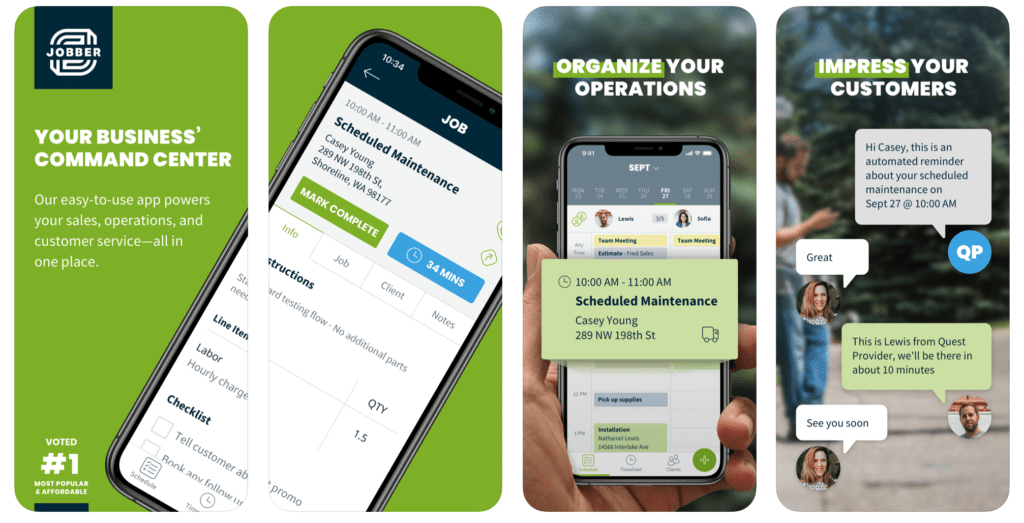
Running a painting business comes with constant moving parts—quotes, crews, schedules, and payments.
Jobber brings all of it into one streamlined platform, helping you stay organized without the usual back-and-forth between spreadsheets, texts, and paperwork.
Key features
Whether you’re in the office or on-site, Jobber helps you manage operations more efficiently thanks to these features:
- Use online booking and drag-and-drop scheduling ensures that your crews are always where they’re supposed to be.
- Keep material and labor costs tied directly to your work orders with built-in job costing.
- Schedule jobs and dispatch crews faster with automatically optimized routes.
- Monitor job progress from initial prep to final walkthrough.
- Track painter hours in the field and simplify payroll preparation.
- Accept credit card payments both in person and online.
- Offer a client portal where customers can approve quotes and pay invoices.
Why it’s best for painting contractors
Jobber is one of the best tools for painters’ quotes and invoices. Instead of juggling paper estimates, Excel sheets, and scattered messages, you can create polished quotes in one place—and even boost revenue by adding optional line items or service packages.
Once a job is complete, converting quotes into invoices takes just a few clicks, cutting down admin time and speeding up payments.
Jobber’s drag-and-drop scheduling and online booking tools make it easy to keep crews aligned and jobs on track. Automated reminders and notifications ensure both your team and your clients stay informed without extra effort.
You can also store key job details—like property measurements and before-and-after photos. Plus, automate repetitive tasks such as quote follow-ups and visit reminders, freeing up more time to focus on growing your business.
Finally, manage painting client details all from one place with Jobber’s CRM software, to ensure that you’re always delivering top-notch customer service.
READ MORE: Best CRM for painting contractors
Limitations
- No built-in inventory management
Pricing
Jobber starts at $29 per user per month, with three tiered plans to choose from depending on your business needs.
Before Jobber, we were working with carbon copies—we would lose paper all the time, or clients would lose their estimates or invoices. Jobber has made my company way more organized.
QuickBooks Online
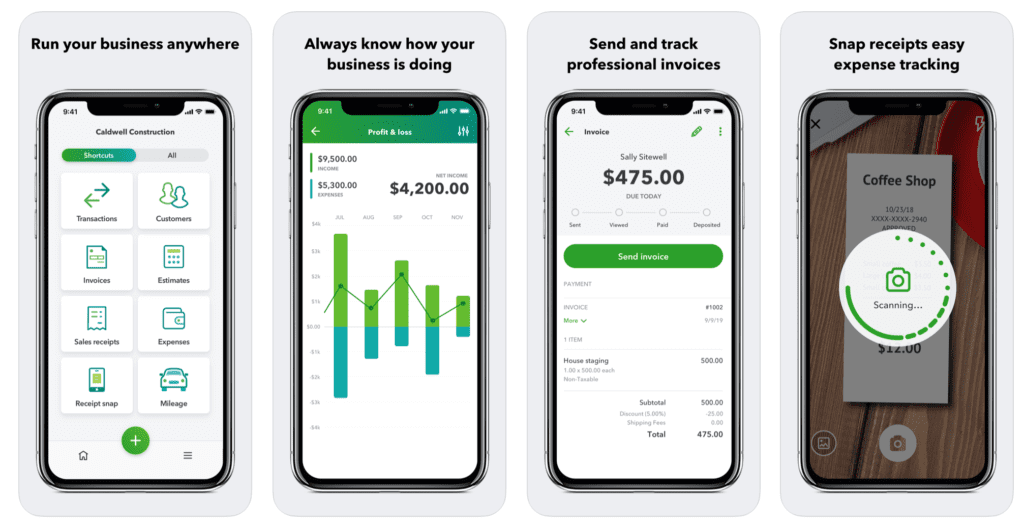
QuickBooks Online is the best app for painters looking to strengthen their accounting processes. It adds flexibility to your finances by letting you manage invoices, expenses, income, financial reports, and payroll from any device.
Key features
QuickBooks Online helps you:
- Create custom professional invoices quickly and let customers pay online to improve cash flow and reduce time spent chasing payments.
- Track expenses such as paint, supplies, fuel, and equipment expenses in one place while digitally storing receipts for easier bookkeeping and tax prep.
- Simplify payroll for employees and painting subcontractors by tracking wages, hours, and tax deductions directly within the platform.
- Generate real-time financial reports to understand which jobs are most profitable and make smarter business decisions.
- Monitor labor and material costs for individual painting projects so you can stay on budget and improve future estimates.
Pro Tip: You can integrate QuickBooks Online with apps like Jobber to create an all-in-one solution and run a tighter ship.
Why it’s best for painting contractors
Every painting business needs reliable accounting software, and QuickBooks Online makes it easier to stay on top of your finances as your company grows.
Use QuickBooks Online to monitor profitability, track job-related expenses, and reduce time spent on manual bookkeeping.
With accurate financial reporting and automated accounting tools, you can make smarter business decisions and better understand where your money is going.
It’s especially valuable if you multiple jobs at once, since you can quickly track income, expenses, payroll, and tax information across your entire operation.
Limitations
- Advanced features like payroll and project profitability may require higher-tier plans
Pricing
QuickBooks Online pricing starts at $19 per user per month, with four tiered plans to choose from.
FleetSharp
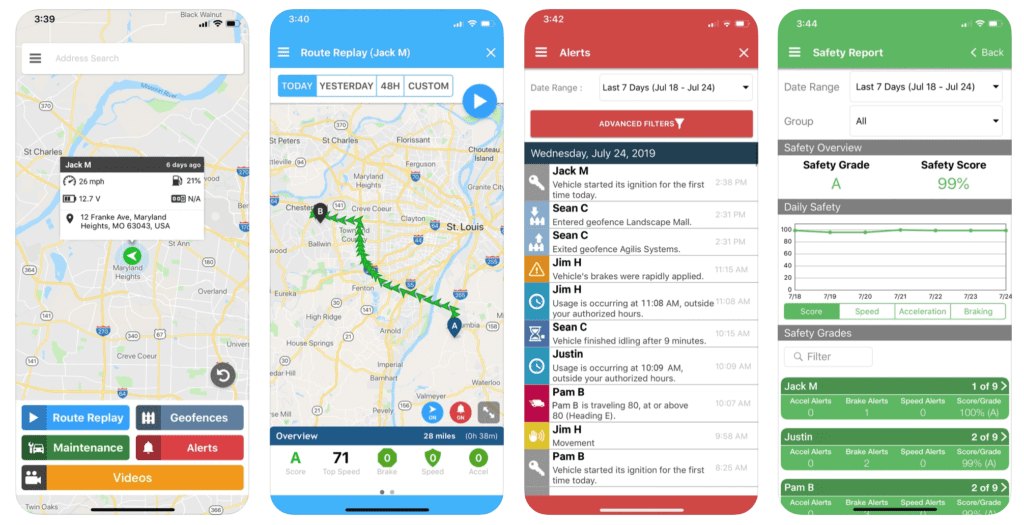
Fleetsharp is the best fleet management app for painting contractors who manage multiple crews, vehicles, and job sites throughout the day.
With real-time GPS tracking and route optimization, it helps reduce fuel costs, improve response times, and keep crews running efficiently.
Key features
Fleetsharp helps you:
- Monitor where your crews and vehicles are throughout the day with real-time GPS tracking so you can dispatch painters faster and respond to schedule changes more efficiently.
- Plan more efficient driving routes to reduce fuel costs, minimize travel time, and fit more jobs into the day.
- Monitor driver behavior by tracking speed, harsh braking, and other driving habits to improve safety and reduce unnecessary vehicle wear and fuel usage.
- Receive reminders for oil changes, inspections, and routine maintenance to help prevent costly breakdowns and downtime.
- Automatically track mileage and gas usage for better reporting, expense management, and overall fleet efficiency.
Just like QuickBooks, FleetSharp integrates with Jobber to make smarter, faster scheduling decisions.
Why it’s best for painting contractors
FleetSharp is especially useful for painting contractors with multiple crews working across different job sites.
By knowing where vehicles are in real time, you can make faster dispatching decisions, improve communication, and reduce delays between jobs.
The app also helps control operating costs by reducing fuel waste, improving driving habits, and keeping vehicles properly maintained. You’ll get key alerts for vehicle diagnostics and maintenance reminders to ensure that your vehicles are always in good health.
Limitations
- Focused primarily on fleet and vehicle management rather than full business operations
- Advanced tracking features may be unnecessary for very small painting businesses with limited vehicles
Pricing
FleetSharp pricing is typically customized based on the number of vehicles and tracking features your business needs. Contact FleetSharp directly for a quote.
Google Workspace
iOS and Android
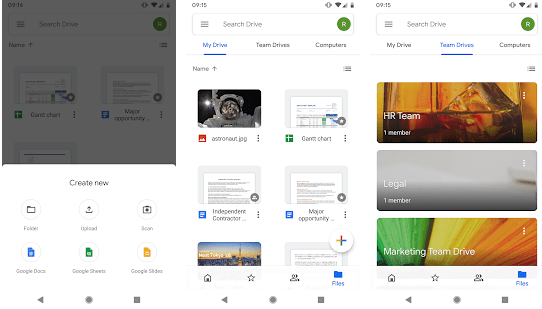
Google provides several free apps—Gmail, Google Drive, G Suite Google Docs, Google Meet, etc.)—collectively called Google Workspace. From emailing clients to drafting and sending contracts, you can manage all aspects of your business from one central platform.
Key features
Google Workspace helps you:
- Create a custom business email address to build credibility and look more professional when communicating with customers.
- Store estimates, contracts, photos, and project files securely in the cloud so your team can access them from the office or job site.
- Work with office staff or team members on quotes, schedules, and project documents simultaneously without sending files back and forth.
- Coordinate job schedules, walkthroughs, and team meetings with Google Calendar scheduling while keeping everyone updated with shared calendars and automatic reminders.
- Meet with customers, suppliers, or remote team members virtually to discuss projects without needing additional software.
Why it’s best for painting contractors
Google Workspace is ideal for painting contractors who want an affordable, easy-to-use system for managing day-to-day business communication and organization.
Because everything is cloud-based, contractors and office staff can access important files, schedules, and conversations from anywhere. It’s especially useful for businesses coordinating multiple crews or working between the office and job sites throughout the day.
The professional email option also helps smaller painting businesses establish trust and present a more polished image to potential customers.
Limitations
- Not designed specifically for painting or field service businesses
- Advanced business management features like estimating, scheduling, and invoicing require additional software integrations
Pricing
Google Workspace pricing starts at $9.20 per user per month. This fee includes a custom business email instead of a generic Gmail one, to further impress your customers with your professionalism.
For example, instead of your email being [email protected], you can change it to [email protected] to add legitimacy when you’re emailing clients.
Slack
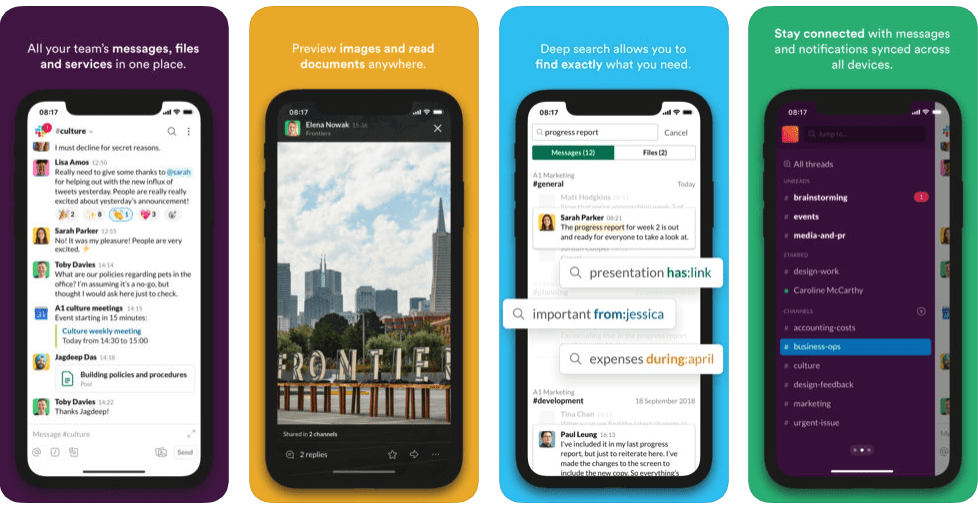
Slack is one of the best communication apps for painting contractors managing crews across multiple job sites.
Instead of relying on scattered text messages and phone calls, Slack keeps team conversations organized in one place through dedicated channels for projects, departments, or customers.
Key features
Slack helps you:
- Keep your teams organized by creating separate channels for crews, projects, clients, or departments so conversations stay focused and easy to find.
- Quickly communicate with painters, office staff, and subcontractors in real time to reduce delays and miscommunication.
- Connect with team members or clients through voice and video calls when a quick conversation is easier than long message threads.
- Upload job-site photos, project updates, contracts, and documents directly into conversations so everyone has access to the latest information.
- Keep field crews informed about schedule changes, urgent updates, or customer requests with mobile notifications and alerts—no matter where they’re working.
Why it’s best for painting contractors
Slack is especially useful for painting businesses with crews working in different locations throughout the day. It centralizes communication, making it easier to coordinate projects, answer questions quickly, and keep everyone aligned.
Use Slack channels to organize conversations by client, job site, or department, helping reduce confusion and ensuring important information doesn’t get buried in text messages or email chains.
It’s also great for sharing job-site photos, discussing special customer requests, and communicating schedule changes instantly.
Limitations
- Can become overwhelming if channels and notifications aren’t managed properly
- Not built specifically for painting contractors
Pricing
Slack has a free plan, with up to 90 days of message history and 10 app integrations. The paid plans start at $8.75 per user per month.
Profit Margin Calculator
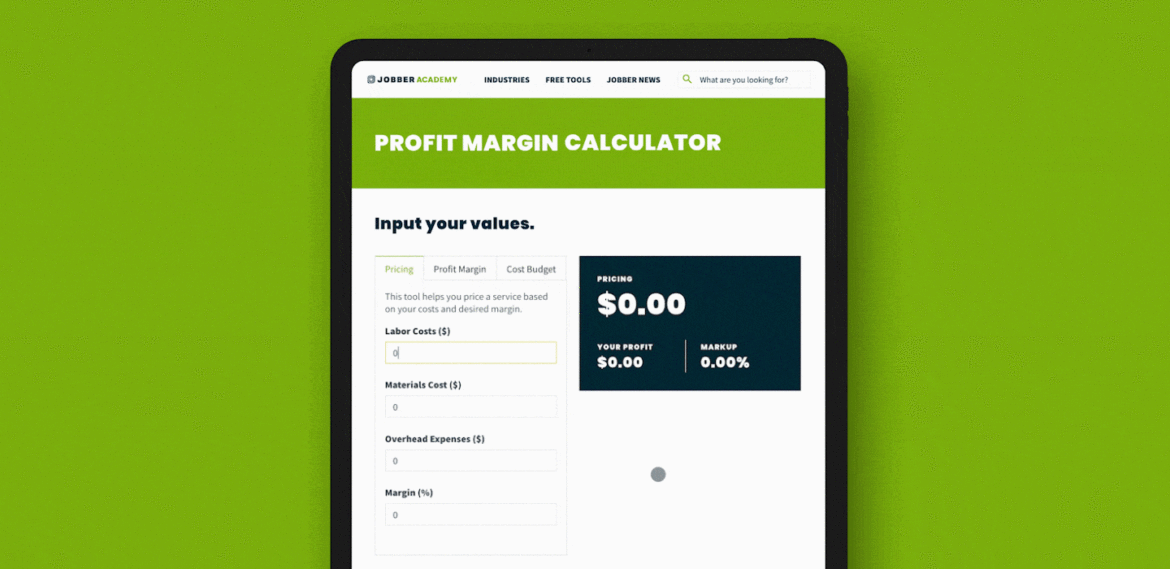
This free 3-in-1 Profit Margin Calculator by Jobber comes in handy when you’re pricing painting jobs to ensure you’re making a profit. This makes it a contender for the best app for painting estimates.
Key features
The Profit Margin Calculator helps you:
- Measure how much profit your painting business keeps after operating expenses with the operating profit margin calculator so you can better understand overall business performance.
- Calculate profitability before overhead costs with the gross profit margin calculator to ensure your labor and material pricing stays healthy on each painting job.
- See your true bottom-line profit after all expenses are accounted for with the net profit margin calculator, helping you make smarter financial decisions.
Why it’s best for painting contractors
Pricing jobs accurately can be challenging, especially when factoring in labor, materials, overhead, and markup. Jobber’s Profit Margin Calculator simplifies the math and helps you understand whether a project will actually be profitable before the work begins.
It’s especially useful for smaller painting businesses that want to improve their estimating process, stay on budget, and increase long-term profitability without relying on complicated spreadsheets.
Because the tool is simple and web-based, you can quickly run calculations from anywhere while preparing quotes or reviewing project costs.
READ MORE: Profit margins guide for small business owners
Limitations
- Focused only on profit margin calculations rather than full estimating or accounting workflows
Pricing
The Jobber Profit Margin Calculator is completely free to use.
Color-picking and painting project planning apps
The following painters apps can help you and your clients plan, match, and pick the best colors for any project.
Paint Color Visualizer
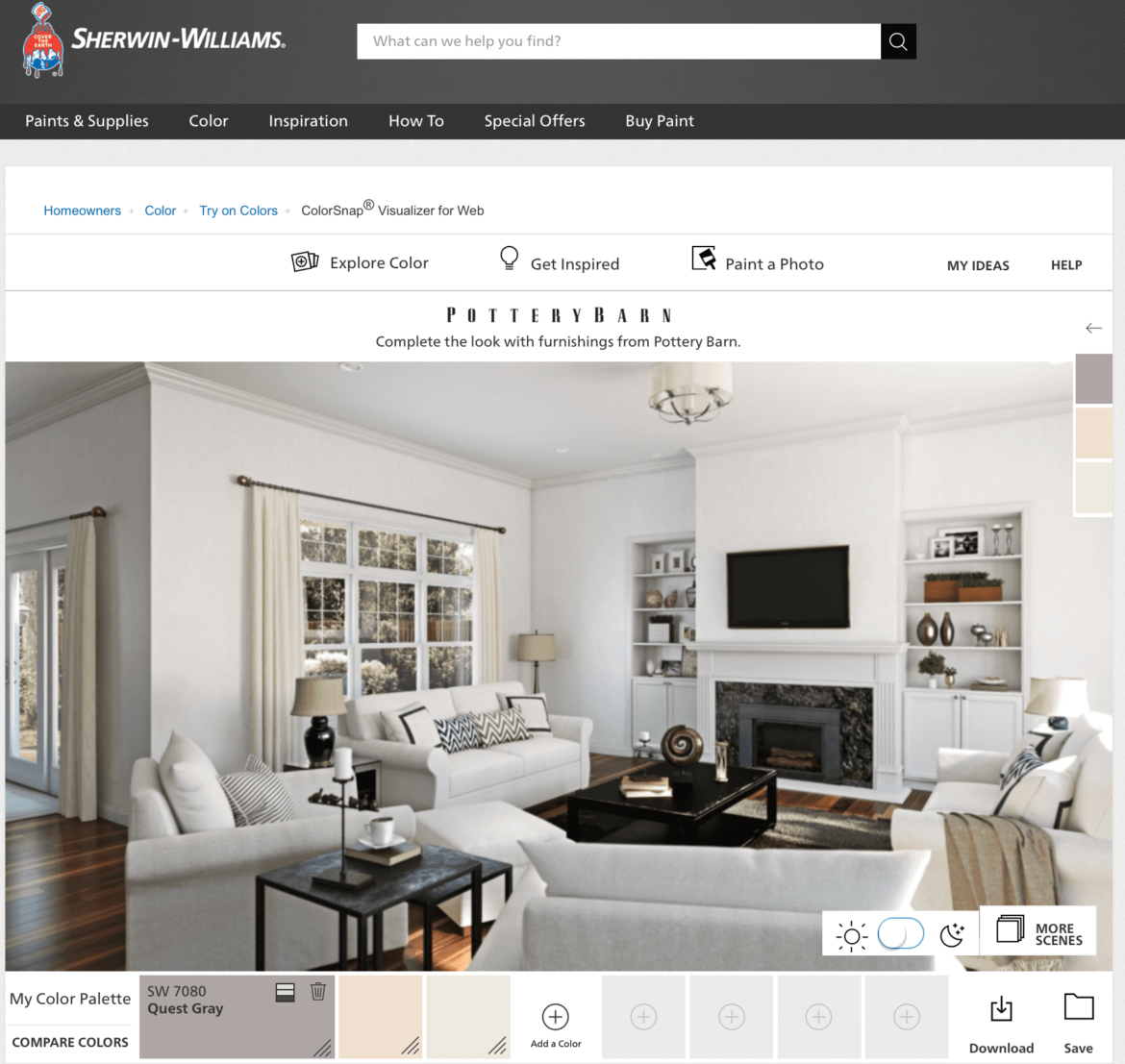
The Paint Color Visualizer by Sherwin Williams helps painting contractors and customers visualize paint colors before a project begins.
Using photos and augmented reality, you can preview different paint options directly on walls and surfaces, making color selection faster and more interactive.
Key features
The Paint Color Visualizer helps you:
- Use photo-based color matching by uploading photos of a room or job site and match colors to Sherwin-Williams paint options to quickly explore design possibilities.
- Use augmented reality paint preview with the “Paint a Scene” feature to virtually change wall colors in real time by tapping surfaces through your phone’s camera.
- Get color palette recommendations, discover complementary paint colors, and coordinated palettes to help clients choose combinations that work well together.
- Save and share project mockups—including visual previews and color selections—with customers so they can review options before approving the project.
- Keep the mobile app handy for estimates and walkthroughs to make color discussions more interactive and professional.
Why it’s best for painting contractors
The Paint Color Visualizer helps you create a better customer experience during the sales and estimating process. Instead of asking clients to imagine what a color will look like, you can show them realistic previews directly on their walls.
This visual approach can help reduce indecision, improve communication, and increase customer confidence before work begins. It’s also a valuable sales tool for upselling accent walls, additional rooms, or premium color combinations.
Because this painters’ app works directly from a smartphone or tablet, you can use it easily during consultations without needing additional equipment or software.
Limitations
- Primarily designed around Sherwin-Williams paint products and color libraries
- Virtual color previews may appear slightly different from final real-world results, depending on lighting and screen settings
Pricing
ColorSnap Visualizer is free to download and use.
READ MORE: Painting equipment list: 50 must-have tools for professional painters
Paint Tester
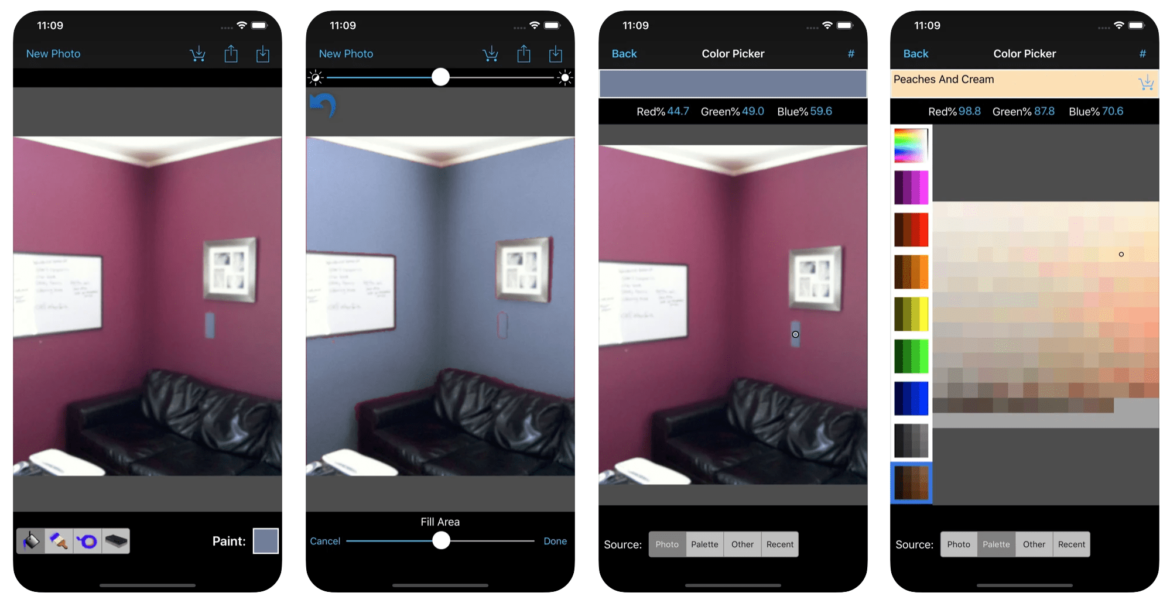
Similar to Sherwin Williams Paint Color Visualizer, Paint Tester allows you to take and upload an image of a room to digitally apply paint colors to walls and create realistic previews for clients during the estimating process.
Key features
Paint Tester helps you:
- Upload photos of a customer’s space and test different paint colors directly on the walls to help clients visualize the finished result.
- Use the Smart Paint Bucket tool to apply paint colors neatly within wall boundaries without overlapping into surrounding areas for more realistic previews.
- Choose from a wide range of colors using the built-in color picker to experiment with different design options quickly.
- Send digital room mockups to clients alongside estimates to improve communication and help close jobs faster.
- Use the mobile app during walkthroughs or estimates to make color discussions more interactive and professional.
Why it’s best for painting contractors
Paint Tester is especially useful for painting contractors who want a quick, easy way to help customers feel confident about color choices before work begins.
By showing realistic previews instead of relying on paint swatches alone, contractors can reduce indecision and improve the customer experience during consultations.
The app also helps create more polished estimates by allowing painters to include visual examples with their proposals.
Because it’s lightweight and mobile-friendly, Paint Tester works well for contractors who want a straightforward visualization tool without needing complex design software.
Limitations
- Only available on iOS devices
- Less advanced color matching and brand integration compared to larger paint manufacturer apps
Pricing
Paint Tester is free to download and use.
Benjamin Moore Color Portfolio
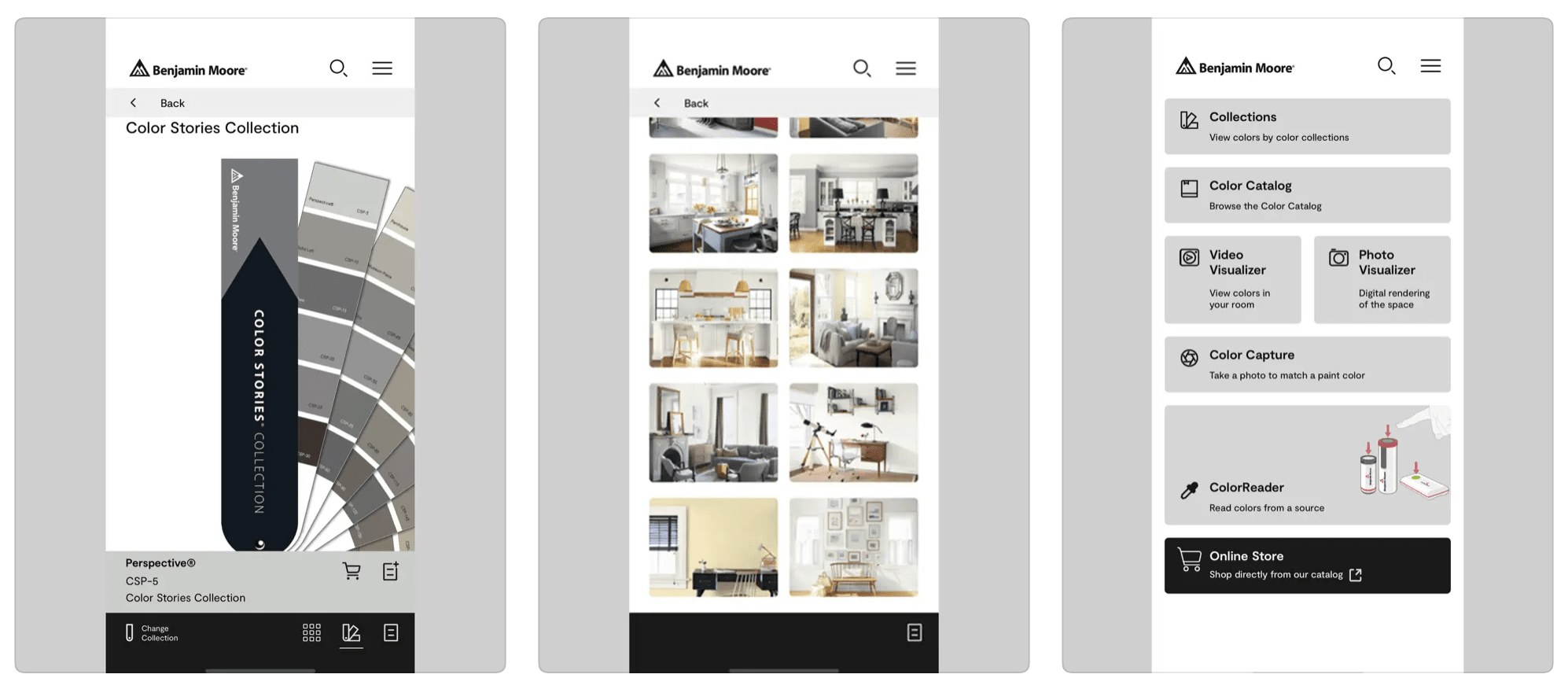
The Benjamin Moore Color Portfolio app is the best app for painting contractors to instantly color match on the job. The app helps painting contractors quickly match paint colors and visualize results directly from a smartphone or tablet.
Connected to Benjamin Moore’s extensive paint database, the app gives you access to thousands of colors while helping clients preview how paint selections may look in real spaces.
Key features
Benjamin Moore Color Portfolio app helps you:
- Match colors directly from photos or real-world surfaces using Benjamin Moore’s extensive digital paint library.
- Access thousands of Benjamin Moore paint colors in the database from your mobile device while working on-site or meeting with clients.
- Preview how selected paint colors may look in a finished space before painting begins with video and room visualization tools.
- Store customer color selections and project palettes for future reference and easier
- Use the mobile app during estimates and walkthroughs to create a more interactive and professional customer experience.
Why it’s best for painting contractors
The Benjamin Moore Color Portfolio app is especially valuable for painting contractors who frequently help customers choose or match paint colors during consultations.
Instead of relying solely on physical swatches, you can test colors digitally and show clients realistic previews directly from a smartphone or tablet. This can help speed up decision-making, reduce uncertainty, and improve overall customer confidence before work begins.
The app is also useful for contractors working on touch-ups, repaints, or color-matching projects where finding the closest paint match quickly can save time and improve accuracy.
Limitations
- Primarily focused on Benjamin Moore paint products and color systems
Pricing
The Benjamin Moore Color Portfolio app is free to download and use, with optional in-app purchases.
Apps for marketing your painting business
Whether you’re just starting your painting business or want to advertise to a broader audience, having the right marketing app makes all the difference.
Here are six of the best apps for painting contractors to find leads, grow client relationships, and create stunning before-and-after photos to win more business.
Jobber Reviews
iOS and Android
Online reviews can make a major difference in whether potential customers choose your painting business. Jobber Reviews helps you automatically collect customer feedback and grow your reputation on Google without adding extra administrative work.
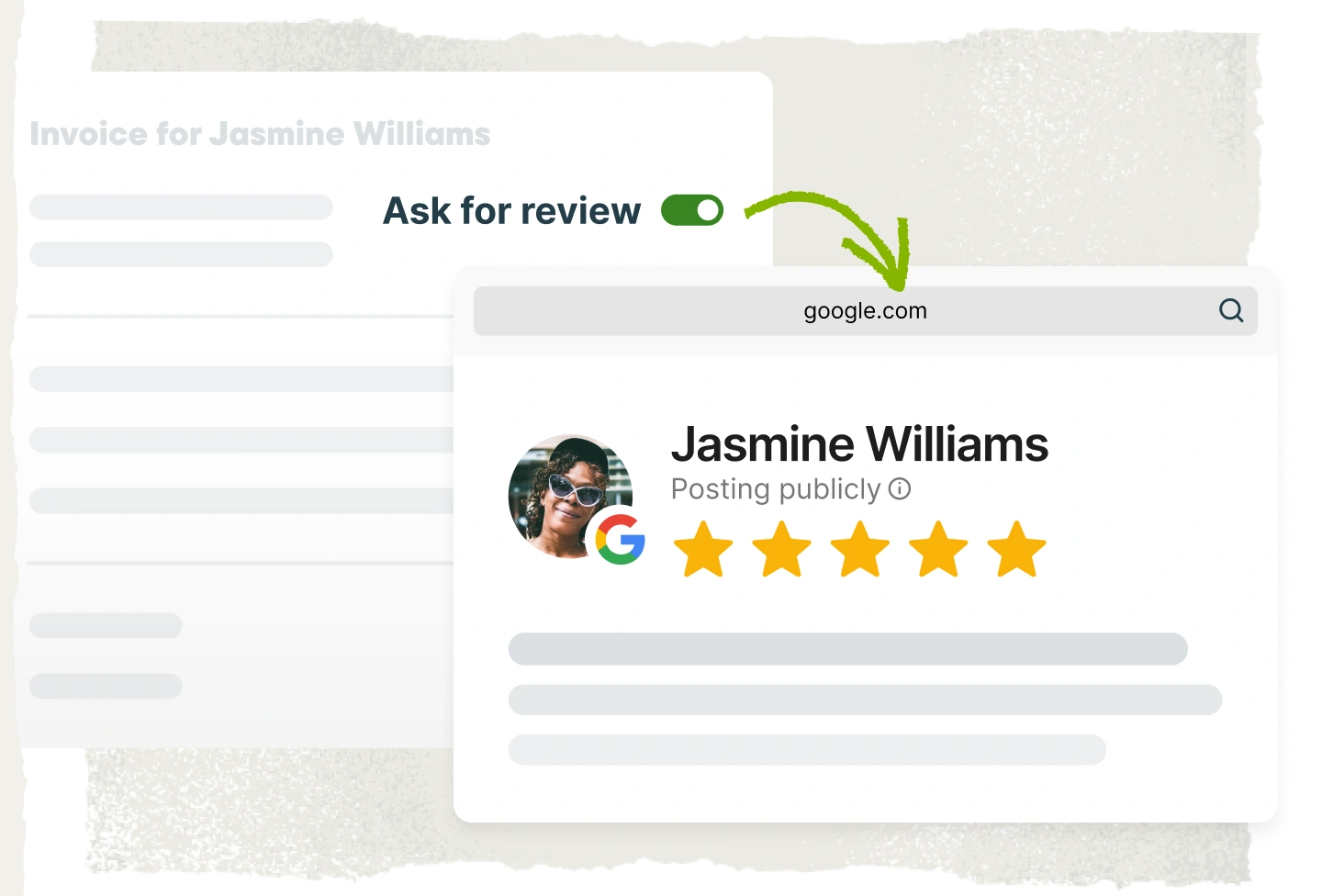
By automating review requests after completed jobs and paid invoices, Jobber makes it easier to consistently generate positive Google reviews and show up in local search results.
Key features
Jobber Reviews helps you:
- Send review requests to customers automatically after completed jobs or paid invoices so you never forget to ask for feedback.
- Make it easy for customers to leave reviews by sending them links directly to your Google Business Profile in just one click.
- Choose whether to send a review request directly from an invoice inside Jobber.
- Monitor your latest Google reviews, average rating, and customer feedback from a centralized dashboard.
- Respond to customer reviews directly within Jobber to help maintain a professional online reputation.
Why it’s best for painting contractors
Painting contractors rely heavily on local reputation and word-of-mouth referrals, and Google reviews are often one of the first things potential customers check before requesting a quote.
Jobber Reviews helps you consistently collect more positive reviews without manually following up with every customer. By automating the process, painting businesses can build trust online, improve local search visibility, and attract more leads over time.
It’s especially useful for busy contractors who want to strengthen their reputation while keeping review management simple and organized.
Limitations
- Primarily focused on Google reviews
Pricing
Jobber Reviews is available as part of Jobber’s marketing tools as an add-on to a Jobber subscription.
Jobber Campaigns
iOS and Android
Email marketing is targeted, allows you to easily stay top-of-mind, and has one of the best returns.
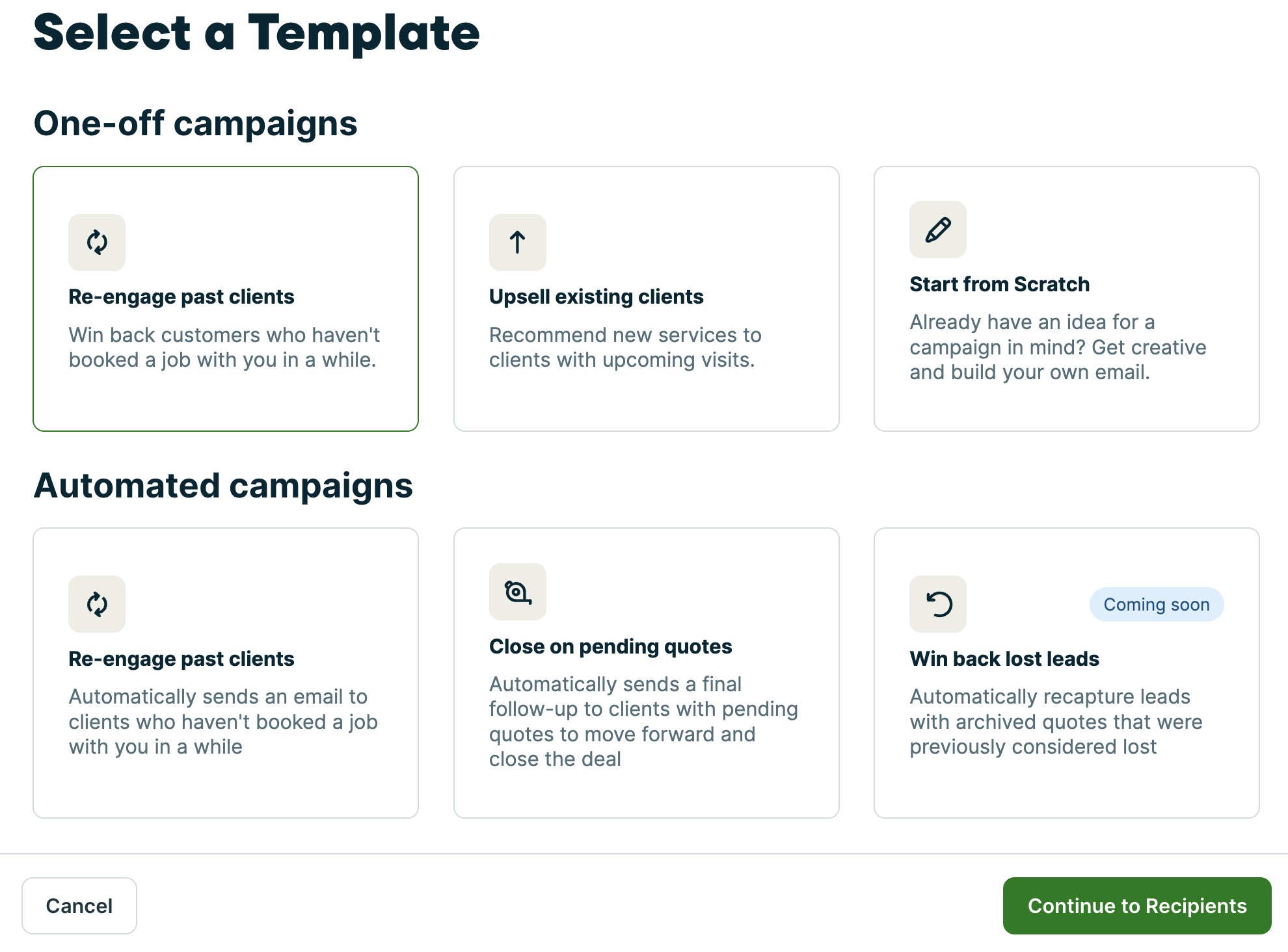
When you use Jobber Campaigns to create email campaigns for your painting business, you can choose from premade templates and customize them with your company branding.
Retargeting your past customer list—especially if you offer recurring services—is a home run and will help grow your business.
Key features
Jobber Campaigns help you:
- Create professional marketing emails using prebuilt templates that can be personalized with your painting company’s branding and services.
- Target specific customer groups based on tags, job history, or completed services like interior or exterior painting.
- Use existing customer information from Jobber to build and send campaigns without importing separate contact lists.
- Monitor email opens, link clicks, and job conversions from a centralized dashboard to measure marketing results.
- Send reminders and promotions to previous customers to generate repeat painting work throughout the year.
Why it’s best for painting contractors
Painting contractors often rely on repeat business, referrals, and seasonal demand, making email marketing a valuable way to stay connected with customers over time.
Jobber Campaigns simplifies the process by allowing contractors to target the right customers with the right message based on past work history or service type.
For example, you can send exterior painting promotions to homeowners whose homes were painted several years ago or follow up with commercial clients about maintenance services.
Because campaign tracking is built into the platform, you can also see which emails are generating the most engagement and new jobs.
Limitations
- Focused primarily on email marketing rather than broader marketing campaigns
Pricing
Jobber Campaigns is available as part of Jobber’s marketing tools as an add-on to a Jobber subscription.
Responsibid
Desktop and mobile browsers
If your quoting process is inefficient and your proposals are being ignored, it may be time to invest in sales software such as Responsibid.
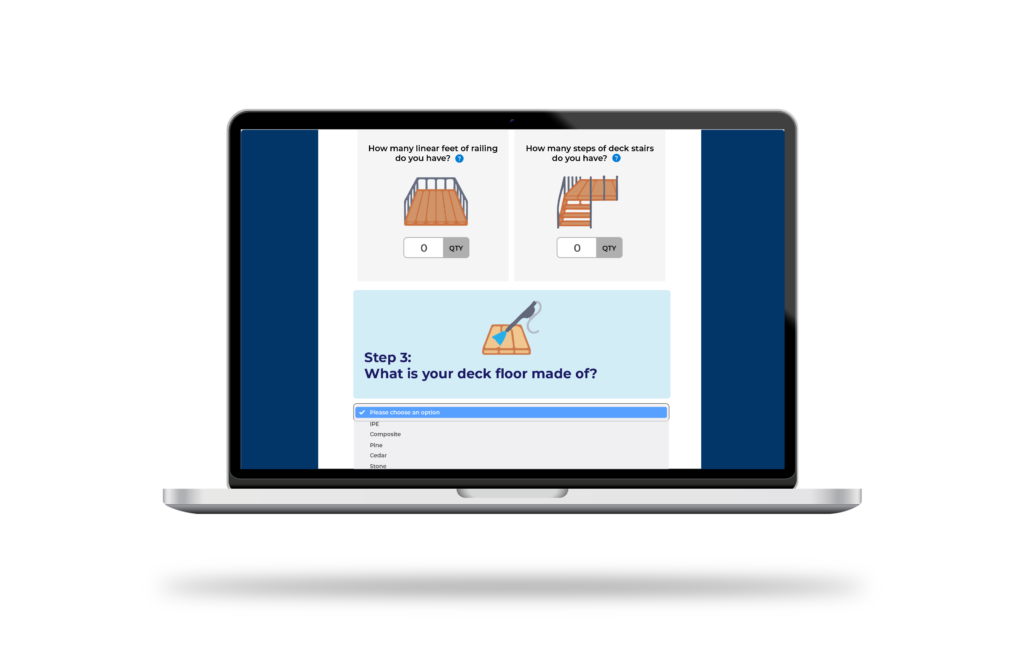
ResponsiBid can help you automate your sales process, respond to leads faster, and close more jobs. Instead of manually handling every quote request and follow-up, you can guide leads down the pipeline easier through automation.
Key features
Responsibid helps you secure more painting contracts by letting you:
- Create and send painting estimates quickly through your website, email, phone, or in-person consultations to reduce delays in the sales process.
- Allow customers to select available appointment times that work best for them through online scheduling, helping reduce scheduling back-and-forth.
- Send automatic follow-up emails and text messages to keep leads engaged and improve quote conversion rates.
- Organize incoming leads and automate parts of the sales workflow so no opportunities fall through the cracks.
- Connect ResponsiBid with platforms like Jobber and Zapier to streamline scheduling, customer management, and workflow automation.
Why it’s best for painting contractors
Slow response times or inconsistent follow-ups can cause you to lose jobs. ResponsiBid helps solve that problem by automating key parts of the sales process and making it easier for customers to request quotes and schedule appointments.
The software is especially great for contractors handling a high volume of estimates or wanting to improve lead conversion without adding more administrative work. Automated follow-ups can also help push potential customers down the pipeline and help you stay top-of-mind.
Overall, ResponsiBid helps painting businesses create a more professional customer experience while increasing efficiency.
Limitations
- Focused primarily on sales and lead conversion rather than full business management
- Can be pricey for small businesses
Pricing
ResponsiBid lets you start off with one user for free. After that, their Scaling pricing plan starts at $629 for the first month, then $179 per month after that.
Canva

Canva is an easy-to-use DIY design tool. It can be used to create marketing materials such as email campaigns, painting flyers, door-to-door campaigns, business cards, and even social media images.
Key features
Canva can help you:
- Create flyers, business cards, door hangers, estimates, and social media graphics using ready-made templates designed for easy editing.
- Upload and edit your own project photos to create eye-catching before-and-after images that help showcase your painting work.
- Access free stock photos, icons, and design elements to enhance your marketing materials without hiring a designer.
- Design posts, ads, and promotional graphics optimized for platforms like Facebook and Instagram to help grow your online presence.
- Create and edit marketing materials from your phone, tablet, or desktop so you can work from anywhere.
Why it’s best for painting contractors
Canva makes it easy to create polished branding and promotional content in-house. It’s especially useful for showcasing completed painting projects through before-and-after photos, seasonal promotions, and social media posts.
You can quickly create materials for door-to-door marketing, online advertising, customer follow-ups, and local promotions—without needing advanced design skills.
Because Canva is simple and highly visual, it helps smaller painting businesses present a more professional image and stand out from competitors.
Limitations
- Advanced design customization is more limited compared to professional graphic design software
- Some premium templates, images, and features require a paid subscription
Pricing
Canva offers a free plan with access to basic templates and design tools. Canva paid plans start at $18 per user per month.
Nextdoor

Nextdoor is a neighborhood-based social media network where homeowners often look for nearby services and recommendations, making it the perfect app for you to establish yourself as a painting expert in your community.
READ MORE: Why you should advertise on Nextdoor
Key features
Nextdoor helps you:
- Create a business page to introduce your painting services and establish credibility within specific neighborhoods.
- Answer homeowner questions, provide painting advice, and demonstrate expertise to build trust and visibility.
- Collect and respond to recommendations from satisfied customers, helping increase your reputation within local communities.
- Run sponsored posts, local deals, and business ads targeted to specific neighborhoods to reach high-intent homeowners.
- Stay visible to nearby homeowners through posts, recommendations, and community discussions.
Why it’s best for painting contractors
Nextdoor is especially effective for painting contractors because it targets homeowners in the exact areas where you work. Instead of broad advertising, it allows you to focus on hyper-local marketing where trust and reputation matter most.
By engaging directly with neighbors, answering questions, and collecting recommendations, you can quickly build credibility and generate word-of-mouth leads. It’s particularly useful for residential painters looking to grow within specific communities or service areas.
Sharing your Nextdoor profile on invoices, emails, and marketing materials can also help increase reviews and referrals over time.
Limitations
- Reach is limited to users within specific neighborhoods and active Nextdoor communities
- Engagement can vary depending on local activity levels and user participation
Pricing
Nextdoor offers free business profiles with optional paid advertising features, such as sponsored posts and local deal promotions.
Angi
Last on our list of the best apps for painting contractors is Angi.
Angi, formerly Angie’s List, is one of the best lead generation platforms for painting contractors. It helps contractors find new clients, request reviews, and grow their local presence through paid and free listing options.
READ MORE: The best lead generation platforms for contractors
Key features
Angi helps you:
- Connect with homeowners in your service area who are actively searching for painting contractors.
- Create a professional profile showcasing your services, reviews, and past work to attract potential customers.
- Build credibility by collecting and displaying verified customer reviews from completed painting jobs.
- Choose between organic listings or paid advertising to increase exposure and receive more leads.
- Track, respond to, and manage incoming customer inquiries directly through the platform.
Why it’s best for painting contractors
Angi can be a useful lead source for painting contractors who want to generate additional job opportunities without relying solely on referrals or direct marketing.
It’s especially beneficial for newer businesses trying to build visibility or established contractors looking to fill gaps in their schedule. Since homeowners on the platform are actively searching for services, leads can be high quality and likely to turn into paid jobs.
Limitations
- Lead quality and volume can vary by region and market competition
- Paid leads may be required to consistently generate results
Pro Tip: Platforms like Angi and HomeAdvisor are often hit or miss because success varies based on factors like region, services, and industry. Don’t be afraid to try other lead generation platforms if Angi isn’t working for you.
Pricing
Angi has a paid and free version. You must sign up to see pricing.
How to choose the best app for your painting business
The best app for your painting business depends on your company size, budget, and biggest operational hurdles.
You might need an all-in-one platform to manage scheduling, estimates, invoices, and customer communication, and everything in between. On the other hand, you may just want specialized tools for accounting, marketing, or crew management.
Before choosing a painting contractor app, consider the tasks that currently slow your business down the most. For example:
- If you struggle with quoting, scheduling, and customer management, look for all-in-one painting contractor software like Jobber.
- If bookkeeping and payroll are your biggest challenges, accounting software like QuickBooks Online may be your top priority.
- If communication between crews and office staff is disorganized, tools like Slack can help centralize conversations and updates.
- If you want to improve lead generation and marketing, apps like Jobber Campaigns, Nextdoor, or Angi may help you attract more customers.
When comparing apps, focus on key factors such as:
- Ease of use: Your team should be able to learn the app quickly without extensive training.
- Mobile functionality: The app should work reliably from job sites.
- Integrations: Choose tools that connect with your existing software to avoid duplicate work.
- Scalability: The best software should grow with your business.
- Pricing: Don’t just compare monthly costs. Consider how much time, admin work, and lost revenue the app could save you.
Invest in the right app for your painting business
With the right mobile app in your toolkit, managing a painting business can be as smooth as a fresh coat of paint.
There’s no shortage of painting apps to help you run and market your painting business. But there’s no need to try them all at once. Instead, select apps that address the biggest gaps in your business and add more to your digital toolbox over time.
Originally published in November 2024. Last updated on May 19th, 2025.
Frequently Asked Questions
-
Jobber is one of the best estimating software for painting contractors. Tools like Jobber help painters build accurate painting estimates by factoring in labor, materials, and job-specific details. Visual apps like ColorSnap Visualizer can also support estimates by helping clients finalize color choices before work begins.
-
Jobber is one of the best apps for painters to track client jobs and progress. Jobber helps painters monitor job progress, schedules, and crew activity in real time. This helps keep your team aligned by centralizing job details, updates, and location tracking in one system.
-
Jobber is the best all-in-one option for small painting businesses because it combines scheduling, quoting, invoicing, and customer management. It helps small teams stay organized without needing multiple separate tools—saving your time and money.
-
Integrating QuickBooks Online with Jobber is a great option for managing invoices and collecting payments. This system allows painters to send invoices digitally, accept online payments, and track cash flow in real time.
-
Jobber is one of the most dependable all-in-one mobile apps for managing painting businesses. It consistently performs well for scheduling, quoting, and customer management across both mobile and desktop devices.